

TL;DR overview
- The architecture gap is the growing divergence between the intended design of a codebase and the actual structure that emerges as teams prioritize delivery speed over architectural integrity, making the code progressively harder to change.
- Symptoms include high coupling between modules, duplicated logic across services, and unmaintainable class hierarchies that force developers to understand large sections of the codebase to make small changes.
- SonarQube's maintainability analysis, including cyclomatic complexity, cognitive complexity, and duplication detection, quantifies architectural debt and surfaces the specific patterns that are driving increased change cost.
- Resolving the architecture gap requires both tooling to surface the problem objectively and a quality culture that treats structural improvement as a continuous activity rather than a periodic big-bang refactoring effort.
We have all been there. It is 4:30 PM on a Friday. You are wrapping up a feature that needs to ship next week. You just need to get one piece of data from the Billing service into the UserProfile component.
The "correct" architectural path involves creating a new interface in the Core layer, implementing it in Infrastructure, and injecting it. That is an hour of work. Or, you could just add a direct import statement, a quick "shortcut" across the layers. It works, the tests pass, and you go home on time.
One shortcut does not kill a project. But technical debt is rarely about one shortcut. It is about the accumulation of hundreds of these micro-decisions over time. Eventually, the clean, layered architecture you drew on the whiteboard on Day 1 dissolves. The "Presentation" layer is talking directly to the "Database" layer. Circular dependencies (tangles) appear like knots in a shoelace. Take a look at this screenshot
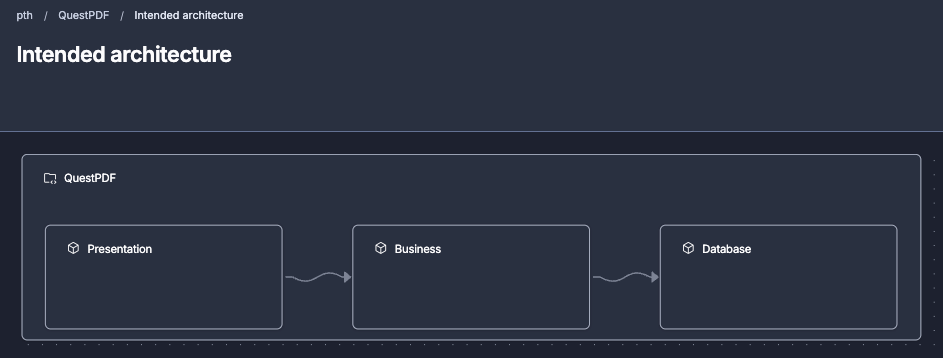
Since there is no defined relationship between “Presentation” and “Database”, a coded direct relationship falls outside the intended architecture.
This divergence over time between the intended architecture and the current architecture of a project is called architectural drift. It is the silent killer of engineering velocity. The structural debt accumulated from architectural drift is why "simple" changes in legacy codebases take three days instead of three hours.
For years, we have tried to solve this with wikis, distinct "architect" roles, and manual code reviews. But documentation begins to rot the moment it is written, and architects often don’t maintain their architectural documentation. Human reviewers cannot keep an entire dependency graph in their heads. Some form of living software architecture documentation to aid teams is missing.
That changes now. With the new architecture capability in SonarQube, we are moving architectural governance out of the wiki and into the workflow. Here is how it works, and why it matters for your daily dev loop.
The problem: The documentation-reality gap
Most organizations have guidelines. They have rules about which modules can talk to which, where domain logic should live, and how data should flow. These guidelines exist for a reason: to keep the code maintainable, testable, and modular.
The problem is not the guidelines; the problem is visibility and workflow.
When you are deep in the IDE, focused on syntax and logic, the "architecture" is an abstract concept. You cannot see that importing com.app.utils into com.app.domain creates a cycle. You only see that the compiler accepts it.
This disconnect creates a documentation-reality gap.
- The intended architecture: The pristine mental model in the lead architect's head or captured in software design documentation.
- The actual architecture: The messy, tangled reality of the codebase.
As this gap widens, you enter the "Big Ball of Mud" phase. Refactoring becomes risky because you don't know what will break. Onboarding new developers takes months because there is no logical structure to follow. And with the rise of AI assistants generating code at breakneck speeds, this entropy is accelerating. AI agents optimize for local correctness (the function works), not global structural integrity (is the architecture respected).
We need a way to see the reality and enforce the intent.
Introducing architecture in SonarQube
SonarQube has introduced a dedicated architecture capability designed to bridge this gap. It works by treating your architecture as a tangible, trackable quality metric, just like code coverage or security vulnerabilities. When you have the capability added to your project, you will see a link on the branch page of your project

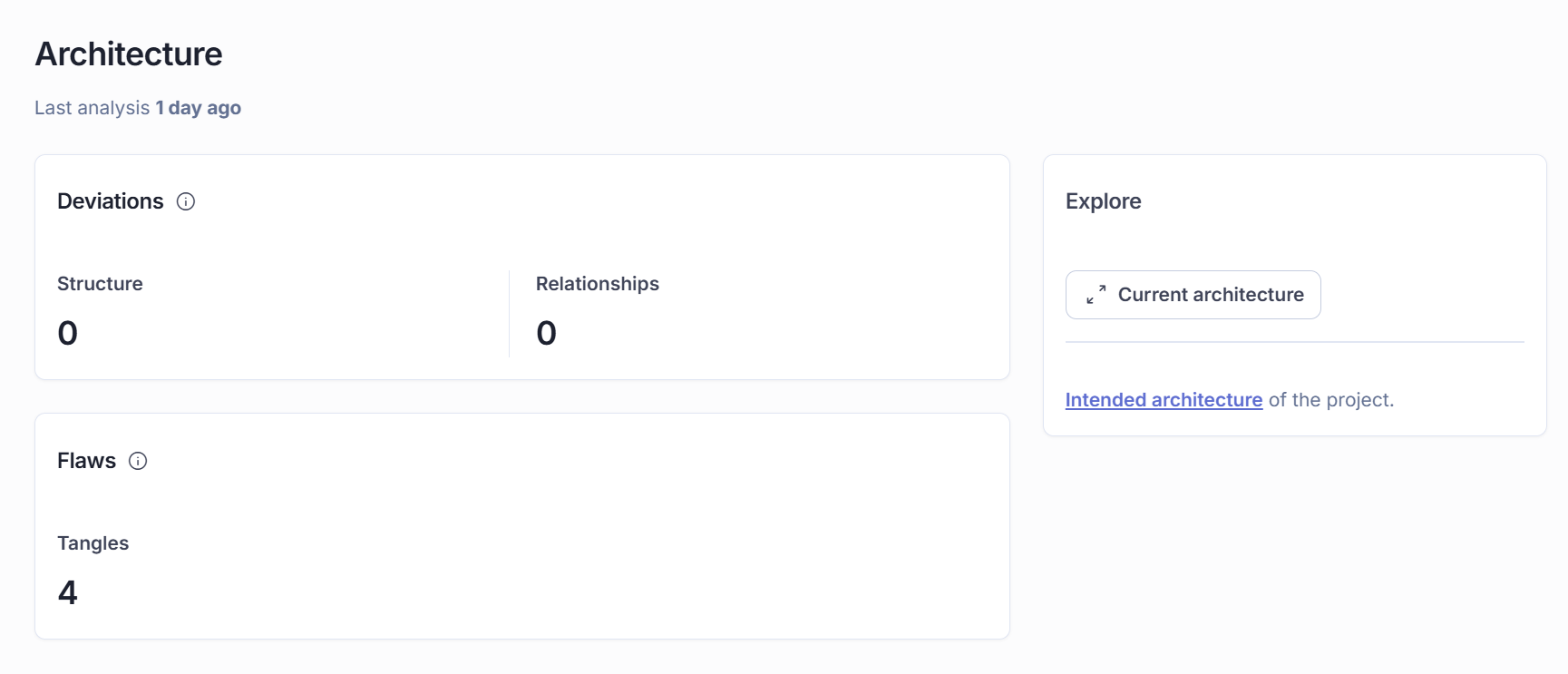
Clicking that link takes you to the summary page where it allows you to analyze the architecture of the project
Architecture operates on 2 core concepts:
- Structure: How your code is organized (containers, packages, directories).
- Relationships: How those containers interact (dependencies, imports).
- Design: The rules that govern those relationships [Coming Soon].
By analyzing your source code, SonarQube reverse-engineers the actual architecture, making the up to date current architecture available to all (is this not great?) and compares it against your intended architecture. When they don't match, it creates an issue in SonarQube that fits seamlessly into the team's standard daily workflow.
Here is how this capability empowers you to take back control of your codebase.
1. Visualization: Seeing the invisible
The first step to fixing a problem is seeing it. SonarQube generates an architecture map of your codebase. This isn't a static image; it's a live, interactive visualization of your project's dependencies.
The map uses "levelization" logic to organize your containers.
- Left side: High-level orchestrators and UI components.
- Right side: Low-level utilities and core domain entities.
- Flow: Dependencies should generally flow from left to right.
If you see an arrow pointing backwards (right-to-left), you instantly spot a potential feedback loop or layering violation. You can zoom in from high-level modules down to specific packages, inspecting the "weight" of each container based on lines of code.
For new developers joining a team, this is a superpower. Instead of grepping through files to build a mental map, they can look at the Structure Map and understand the "lay of the land" in minutes.
2. Definition: the "intended architecture"
Once you see what you have, you can define what you want. The intended architecture editor allows technical leads to model the ideal structure.
This works on an allow-list principle. You explicitly define which relationships are valid.
- Rule:
sonar-architecture-frontendis allowed to depend onsonar-architecture-analysis. - Implication:
sonar-architecture-frontendis not allowed to depend onsonar-architecture-plugin.
You can even create placeholders for components that don't exist yet. If you are planning a migration from a monolith to microservices, you can model the future state (e.g., a "Shipping Service" container) and track your progress as you move code into it.
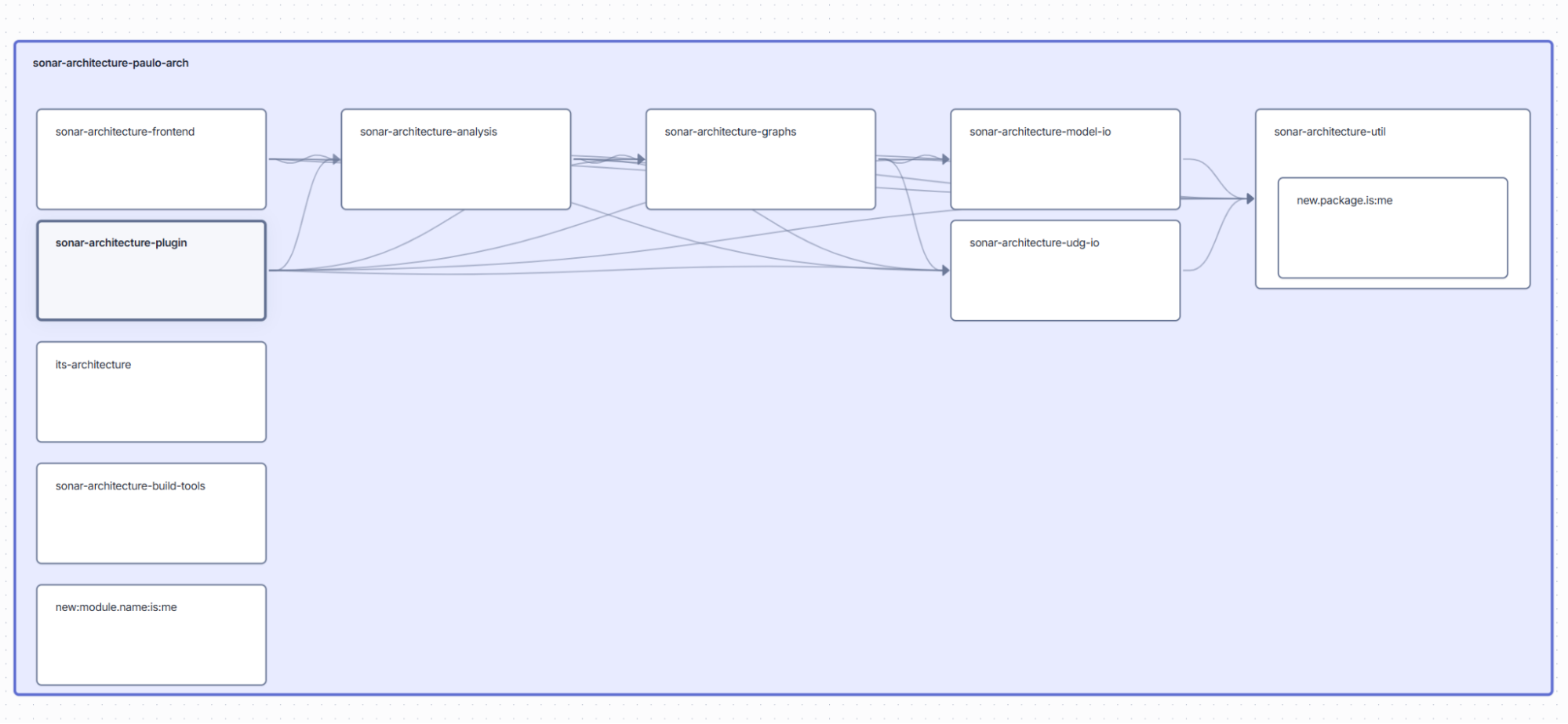
3. Enforcement: Catching the drift
This is where the rubber meets the road. Once the intended architecture is defined, SonarQube monitors every analysis for deviations.
The forbidden dependency: If a developer adds an import that violates your rules (e.g., the Presentation layer importing the Database layer), SonarQube raises a forbidden dependency issue.
You catch the drift before it is even committed.
The wrong location: Have you ever found a file that clearly belongs in the Utils folder but was lazily dropped into the root directory? Or a domain object hiding in the UI package?
SonarQube detects when a file is in the wrong location according to your model. It helps you keep the house clean, ensuring that file organization matches logical intent.
4. The tangle: Breaking the cycle
Another powerful feature, which works out-of-the-box without any configuration, is tangle detection. This automated detection is crucial because, in large codebases, the sheer number of structural issues requires an architect or team lead to prioritize the most critical tangles and turn them into clear, actionable directives for the development team.
A "tangle" is a cyclic dependency. Package A depends on Package B, and Package B depends on Package A.
- Why it hurts: Tangles couple components tightly. You cannot test A without B, and you cannot test B without A. They ruin build times because compilers have to process them together. They make extracting modules impossible.
- The solution: SonarQube identifies these cycles automatically. It highlights the specific links creating the knot, giving you a roadmap to untangle your code.
From the architecture summary page, clicking tangles takes you to the list of tangles that your codebase contains.
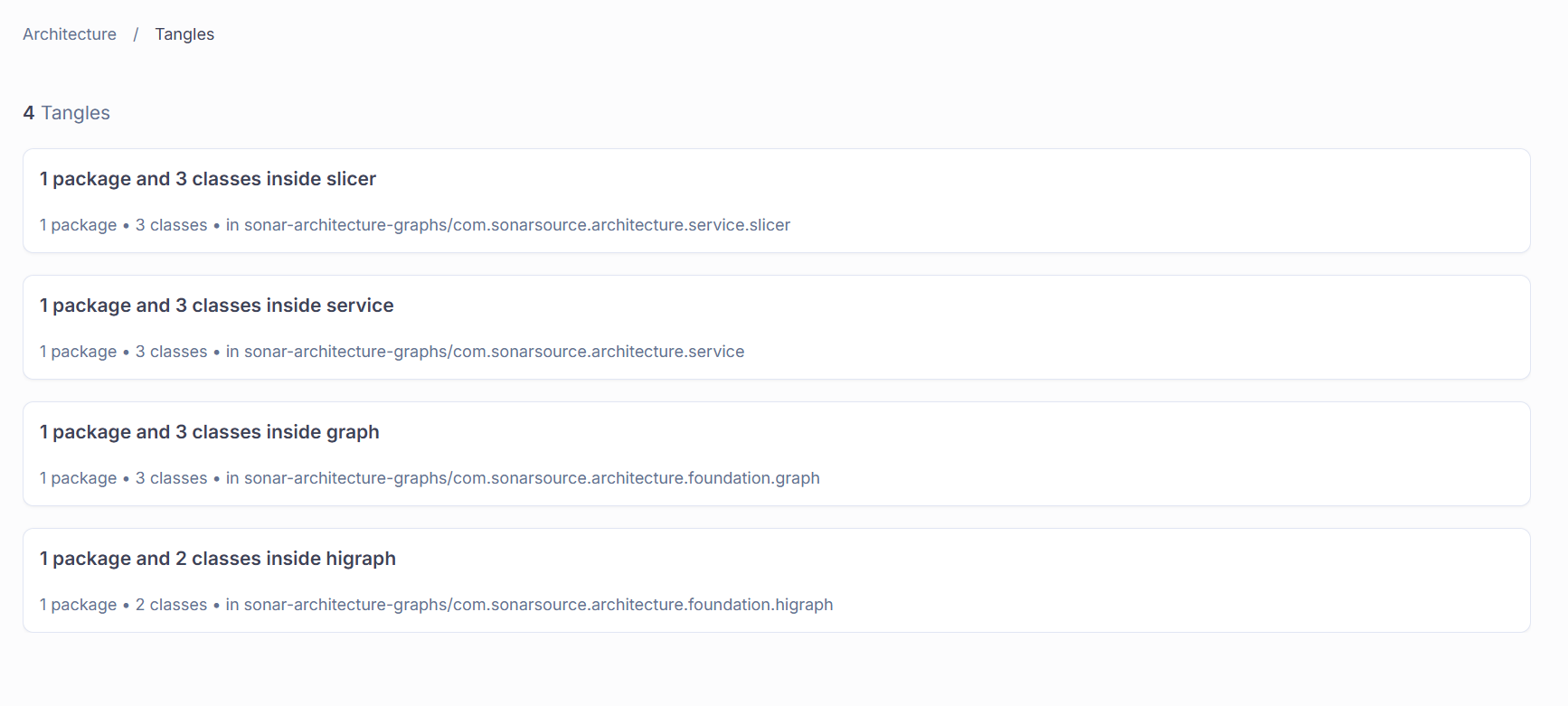
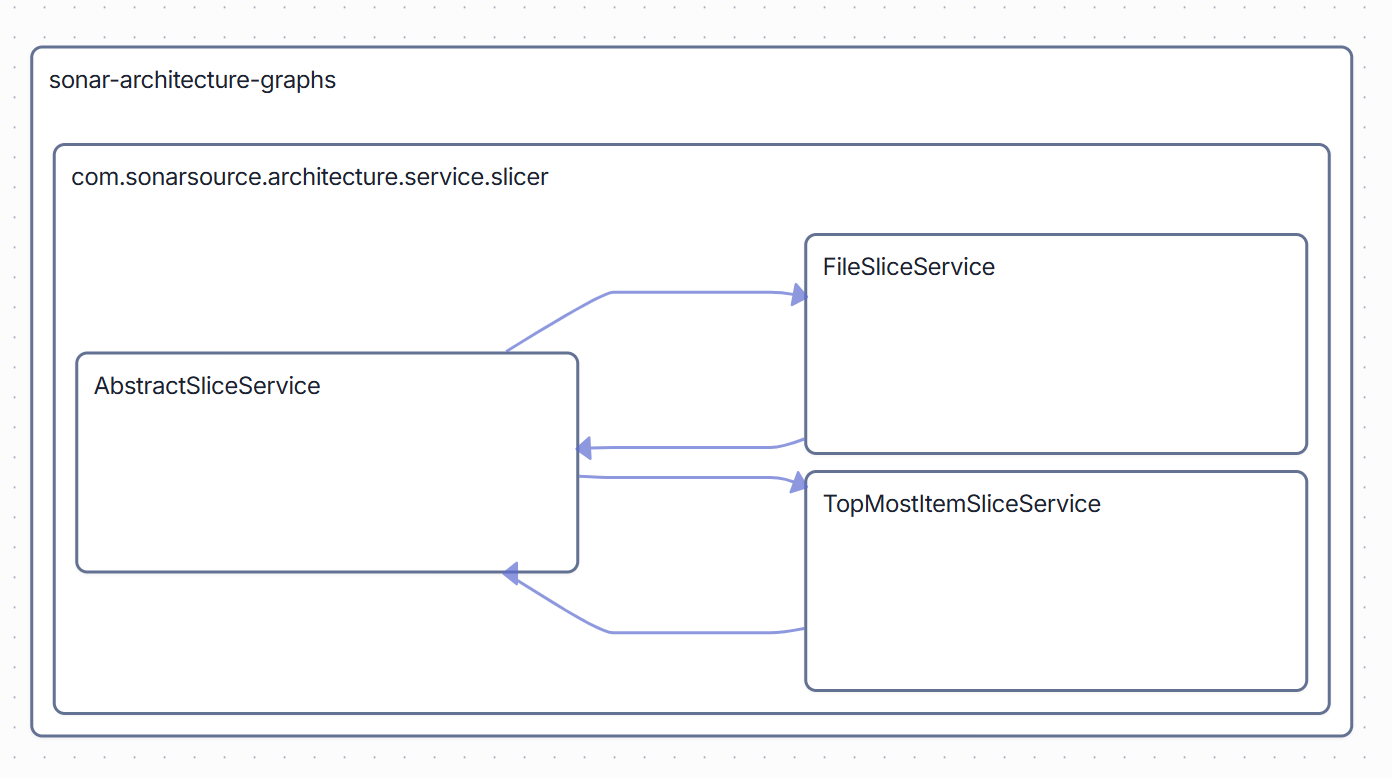
You can see that there are circular dependencies in the com.sonarsource.architecture.service.slider namespace, which goes against the intended architecture.
Architecting for the AI era
We are entering an era of "Vibe Coding", where developers describe what they want, and AI agents generate the implementation. This is amazing for productivity, but risky for structure and maintainability.
AI models are probabilistic. They predict the next token based on patterns, not on your company's specific architectural guidelines. An AI might happily generate a circular dependency to solve a tricky import error, or duplicate logic instead of reusing a shared module.
With SonarQube’s architecture capability, you can embrace AI without fear. You adopt a "Vibe, then Verify" workflow.
- Vibe: Let the AI generate the boilerplate and the logic.
- Verify: Let SonarQube check that the AI's output adheres to your architectural rules.
If the AI introduces a forbidden dependency, the tool catches it. You act as the architect, reviewing the structural integrity of the AI's work, ensuring that today's speed doesn't become tomorrow's technical debt.
How to get started: Focusing on new code
Implementing architectural rules on a 10-year-old codebase can feel daunting. You might turn it on and see 5,000 violations.
Do not panic. You do not need to stop development to fix the past.
SonarQube applies the focus on new code methodology to architecture. You can configure your quality gate to enforce these rules only on new code to help keep a handle on ensuring all new code fits your intended architecture.
- Existing mess: Acknowledged, but park it for now. Changing it can be challenging and risks introducing new issues.
- New code: Must remain pristine. Also it's easier to manage fixing issues in new code since it's fresh in your mind.
If you touch a file to add a feature, you fix the architectural issues in that file. Over time, the codebase naturally heals. You stop the bleeding immediately, and gradually pay down the debt without bringing the feature factory to a halt.
Conclusion: Applications that lasts
Architecture is not about drawing boxes and arrows that nobody looks at. It is about enabling your team to move fast, indefinitely.
When you respect the structure:
- Tests run faster because components are isolated.
- Refactoring is safer because dependencies are explicit.
- Onboarding is easier because the code maps to reality.
The new architecture capability in SonarQube turns "following guidelines" from a bureaucratic chore into an automated, helpful guardrail. It gives you the vision to see your codebase as it truly is, and the tools to shape it into what it should be.
Stop the drift. Visualize the reality. Build code you can trust.
The architecture capability is currently available in SonarQube Cloud and supports Java, JavaScript, TypeScript, Python and C#.
