

OpenInTerminal is a popular macOS utility written in Swift that enhances the Finder by allowing users to quickly open the current directory in their preferred terminal application. It achieves this by integrating with the Finder's toolbar and context menu.
When we investigated the code base, we noticed that developers often use AppleScript as a replacement for the missing eval() function in Swift. This practice of dynamically creating and executing scripts brings the risks usually associated with dynamic languages into a compiled language.
This blog post will cover the technical details of an AppleScript Injection vulnerability discovered in OpenInTerminal, detected by SonarQube. We will walk through how a maliciously crafted folder could be used to execute arbitrary code on a victim's machine. Finally, we will look at how you can avoid such flaws in your code.
Impact
An attacker can exploit this vulnerability to execute arbitrary code on a victim's computer. For a successful attack, the victim must download or receive a malicious folder structure (for example, by cloning an untrusted Git repository or extracting a ZIP archive) and then attempt to open one of the nested folders using OpenInTerminal's functionality with a non-standard terminal or editor.
The attack can be disguised by using symbolic links to make the trigger folder more accessible, reducing the amount of user interaction required.
Technical details
After scanning the OpenInTerminal code with SonarQube Cloud, we are presented with a vulnerability finding:
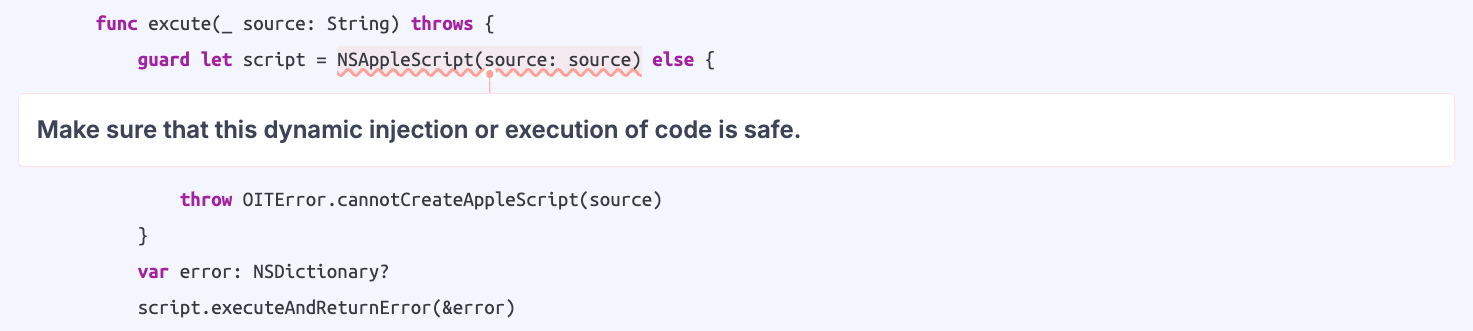
The highlighted line of code will run arbitrary AppleScript code snippets passed to the execute() function. To understand if this is indeed a vulnerability, we need to verify where these scripts are coming from. For example, OpenInTerminal uses AppleScript to launch external applications. To open a given file system path in a terminal, the application constructs and executes an AppleScript do shell script command:
var openCommand = DefaultsManager.shared.getOpenCommand(self, escapeCount: 2)
openCommand += " " + path.specialCharEscaped(2)
let source = """
    do shell script "\(openCommand)"
    """
try excute(source)
The core issue lies in how special characters within the folder path are escaped. The application attempts to escape special characters for a shell context, but this escaping is insufficient for the surrounding AppleScript context.
The specialCharEscaped(2) function escapes characters like a double quote (") with two backslashes (\\"). While this correctly escapes the quote for the shell script portion of the command, it leaves the double quote "unescaped" from the perspective of the outer AppleScript interpreter.
For example, a folder named foo"bar would be escaped into the following AppleScript source code:
do shell script "open -a iTerm /Users/paul/foo\\"bar"This breaks the AppleScript syntax, as the lone " prematurely terminates the string, leading to an error. An attacker can leverage this escaping flaw to break out of the string context and inject their own AppleScript commands.
Exploitation path
Executing a payload isn't straightforward because many special characters needed for simple commands (like spaces and double quotes) are escaped. To build a working exploit, an attacker must overcome several limitations:
Bypassing character restrictions: To form a command string without using double quotes, an attacker can build it by converting ASCII character codes into characters (e.g., ASCII character 65 becomes "A"). Since the & character for concatenation is also escaped, an array of characters can be created and then coerced into a single string using the as text keyword. Additionally, since the space character (0x20) would be escaped, the attacker can use tabs instead.
-- create a char list: ['i', 'd']
set charlist  to  {ASCII  character 105,ASCII character 100}
-- cast to text, joining chars to a single string
set cmd to  charlist  as  text
Overcoming path length limits: macOS limits a single folder or file name to 255 characters, which is too short for a complex payload. The payload can be split across multiple nested folders. The path separator (/) that would break the script is hidden inside AppleScript line comments (--), which causes the interpreter to ignore it and treat the content of the nested folder names as a continuation of the script.
set a to  {ASCII  character 111,ASCII character 112,ASCII character 101,ASCIIcharacter  110,ASCII character 32,ASCII character 45,ASCII  character 97,ASCIIcharacter 32,ASCII character 67,ASCII  character 97}--/
set b to  {ASCII character 108,ASCII character 99,ASCII  character 117,ASCIIcharacter  108,ASCII character 97,ASCII  character 116,ASCII character 111,ASCIIcharacter 114}--/
set cmd to  {a,b} as  text
do  shell script  cmd --/interesting
Finalizing the payload: The final part of the payload must also start with a line comment (--) to ensure the original, trailing double quote from the do shell script command is ignored, preventing a syntax error. To make the attack more convincing, the attacker can add a top-level symlink pointing to the innermost folder so that the victim can end up in a folder whose path contains the payload without seeing or navigating through the suspicious intermediate folders.
When a user with a vulnerable version of OpenInTerminal tries to open the innermost interesting folder, the chained AppleScript payload executes, in this case launching the Calculator application.
Patch
The vulnerability can be mitigated by avoiding AppleScript for running shell commands. The recommended approach is to use the native Process interface to execute commands directly. This avoids passing the command through a secondary interpreter like AppleScript, eliminating the risk of an injection flaw caused by mismatched escaping rules.
The OpenInTerminal maintainer fixed this vulnerability by replacing string-built shell commands with structured argument passing. Previously, the application name and selected path were concatenated into a single command string, manually escaping a denylist of metacharacters before passing it to AppleScript’s do shell script. This was brittle: crafted filenames or application names could cross the data/code boundary and be interpreted as shell syntax.
The fixed implementation sends /usr/bin/open, its options, and each path as separate AppleEvent arguments. The AppleScript then applies POSIX quoted form of to every element individually before execution, ensuring untrusted values remain literal arguments. This mirrors APIs such as execve() or subprocess.run([...], shell=False): preserve argument boundaries instead of trying to sanitize a command string.
Timeline
Summary
This vulnerability in OpenInTerminal is a good reminder of the risks associated with dynamically generating and executing scripts from user-controlled data, which includes something as seemingly innocuous as a file path. When one programming context (Swift) creates code for another (AppleScript) which in turn executes a third (shell), the escaping and sanitization rules must be perfectly aligned for all layers. A mismatch in these rules, as seen here, can create subtle but critical injection vulnerabilities. Developers should always favor native, safer APIs for process execution over dynamic script generation whenever possible.
