

TL;DR overview
- The SonarQube plugin for GitHub Copilot CLI brings quality gates, issue scanning, and Agentic Analysis directly into your terminal workflow.
- This integration connects your terminal-driven workflow to the SonarQube analysis engine using the SonarQube MCP Server or CLI.
- It enables a deterministic verification layer during AI-driven development, allowing AI agents to find and fix code issues automatically.
- The plugin includes secrets-scanning hooks to block the reading, writing, or pasting of sensitive credentials during coding sessions.
The SonarQube plugin for GitHub Copilot CLI is now available. It brings quality gate checks, issue scanning, dependency risk assessments, secrets detection, and SonarQube Agentic Analysis directly into your terminal workflow. If you're building with Copilot CLI, your AI-generated code can now be automatically verified before it leaves your machine.
What is the SonarQube plugin for GitHub Copilot CLI?
The SonarQube plugin for GitHub Copilot CLI connects your terminal-driven workflow to the SonarQube analysis engine, which can be accessed either through our MCP server or our SonarQube CLI.
How the plugin works
Once configured, you get /sonarqube: slash commands inside your Copilot CLI session to list issues, check test coverage, verify quality gate status, and assess dependency risks. No browser. No context-switching.
The core of the integration is the sonar integrate copilot command. This command handles the complex configuration of MCP server entries in your .mcp.json, and the installation of the hooks.json and sonarqube.instructions.md required for secrets scanning and Agentic Analysis. Once you configure the integration, the SonarQube CLI handles container runtime detection and keychain handoff automatically.
Why you should care
As AI agents take on more code generation, the developer's job shifts toward verification and review. That's the heart of the Agent Centric Development Cycle (AC/DC). But relying on an AI to self-correct is non-deterministic. You need a verification layer that is consistent, automatic, and built into the coding loop.
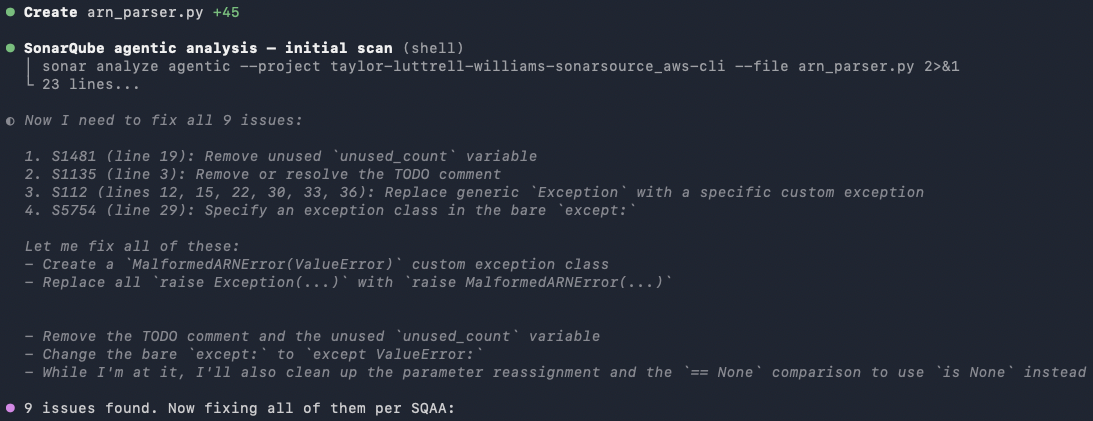
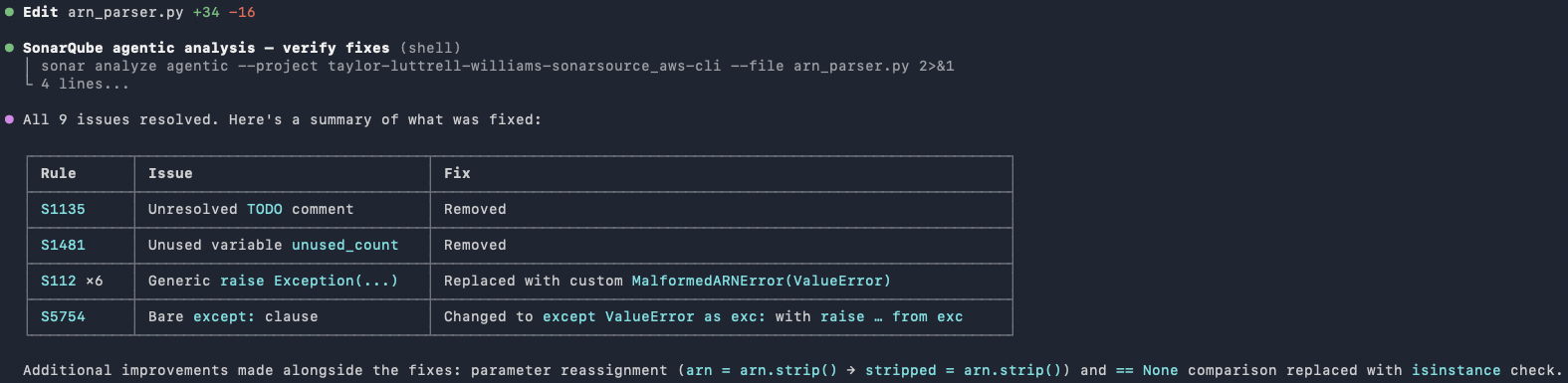
Once SonarQube Agentic Analysis is configured, the Copilot CLI agent doesn't just write code and move on. After every file write, it runs sonar analyze agentic, reads the findings, fixes the issues, and re-runs the analysis until the file comes back with no remaining problems. In testing against a real codebase, the agent caught and resolved multiple issues on its first pass and only finalized the file once verification was complete. All in one terminal session.
SonarQube's analysis is deterministic, comprehensive, and repeatable. Same code, same result, every time. That's a fundamentally different level of assurance than asking an LLM to review its own work. And since the analysis runs within the agentic coding loop, issues get found and fixed before the code even enters the PR flow.
The plugin also installs a secrets-scanning hook that blocks the agent from reading or writing files containing credentials, and instructs the agent to refuse prompts that paste sensitive content directly into the conversation.
Get started now
The plugin is available today and can be configured in a few minutes.
Prerequisites
- An active GitHub Copilot subscription and the GitHub Copilot CLI installed.
- A SonarQube Cloud or SonarQube Server account.
- A local container runtime (Docker, Podman, or Nerdctl) to host the Sonarqube MCP Server.
Step 1: Install the plugin
Run these commands in your Copilot CLI session to add the marketplace and install the SonarQube plugin:
/plugin marketplace add SonarSource/sonarqube-agent-plugins
/plugin install sonarqube@sonar
Step 2: Run the integration
Invoke the plugin’s integration skill to automate the installation of the SonarQube CLI, authentication to SonarQube, and configuration of the SonarQube MCP Server:
/sonarqube:sonar-integrateThis command will walk you through the login process (using sonar auth login) and configure your .mcp.json with a sonarqube entry.
Step 3: Verify and code
Restart your Copilot CLI session to load the new configuration. You can now use /sonarqube: slash commands to list issues, check test coverage, or verify your quality gate status, introducing the deterministic verification layer to the agent’s workflow.
Back your AI-driven development with the industry standard for code verification. Install the SonarQube plugin for GitHub Copilot CLI and start building code you can trust.
