

TLDR overview
- Container scanning is now generally available in SonarQube Advanced Security on SonarQube Cloud, for customers on the Team and Enterprise plans, at no additional cost.
- Scan the container images you build and ship for known vulnerabilities and malicious packages.
- Results appear under Container images in your SonarQube Cloud organization and are managed with the same workflow you use for dependency risks. The scanner can fail your CI build when it finds risks at or above a severity you choose.
- Container scanning is now generally available in SonarQube Advanced Security on SonarQube Cloud. We first announced the open beta on October 22, 2026.
Your code, your dependencies and your images, in one unified workflow
In October, we opened the container scanning beta on a simple premise: the software you ship is more than the code in your repository. Today, container scanning is generally available in SonarQube Advanced Security on SonarQube Cloud.
The timing matters. Yesterday, Calif disclosed Java4Shell (CVE-2026-114938), a memory-corruption flaw in OpenJDK’s Base64 decoder, and fixes were released the same day. It arrives weeks after PHP2Shell. Neither flaw is in code your team wrote or a library you declared. Both live in the runtime inside your container images. A scan of your code and a scan of your dependencies can both come back clean while the vulnerable runtime ships.
That gap is why container scanning belongs in the same workflow as everything else you verify:
- The code you write, analyzed by SonarQube.
- The dependencies you import, covered by SonarQube Advanced Security.
- The images you ship, now covered by container scanning.
These are one application, and a risk in any layer is your risk. With container scanning, image findings appear next to code issues and dependency risks. They are triaged the same way and can fail the same CI build. You get one place to look and one process to run, and one answer when someone asks, “Are we exposed?”
Let’s look at how you can use container scanning to detect images that contain Java4Shell vulnerability.
What happened
Java4Shell is a heap overflow in the optimized Base64 decoder that HotSpot uses on x86-64 processors with AVX-512 VBMI support (Intel Ice Lake or newer, AMD Zen 4 or newer). A remote attacker who can get a crafted Base64 value into a vulnerable Java process can corrupt heap memory, and Calif demonstrated remote code execution without authentication in several widely used applications and frameworks. Base64 decoding is routine in server software, so ordinary features such as authentication can reach the vulnerable code. OpenJDK 17.0.6 and later is affected.
Why your code and dependency scans will not see it
Code analysis and dependency analysis will not show this flaw. It sits in the Java runtime underneath your code, not in your code or your declared libraries. Container scanning in SonarQube Advanced Security looks at the runtime itself.
It matches each image against Linux distribution advisories and it re-checks images you have already scanned based on your organization's re-analysis settings so you do not need to scan them again. Debian, Ubuntu, and Alpine have already published their advisories for CVE-2026-114938. Red Hat has a security bulletin and is preparing updates.
How to check your images
Run the Sonar container scanner on every image that includes a JDK or JRE, locally or in CI.Set your organization and token as environment variables first, so the token doesn’t appear in your command history, logs or process listings
export SONAR_CONTAINER_SCANNER_ORG=<ORGANIZATION_KEY>
    export SONAR_CONTAINER_SCANNER_TOKEN=<TOKEN>
    sonar-container-scanner <IMAGE>
Results appear in SonarQube Cloud under Container images. Images scanned after the CVE was published show it as soon as the scan completes. For images you analyzed earlier, SonarQube Cloud re-checks them for newly published vulnerabilities based on your organization’s re-analysis settings.
1. See which Java versions you run
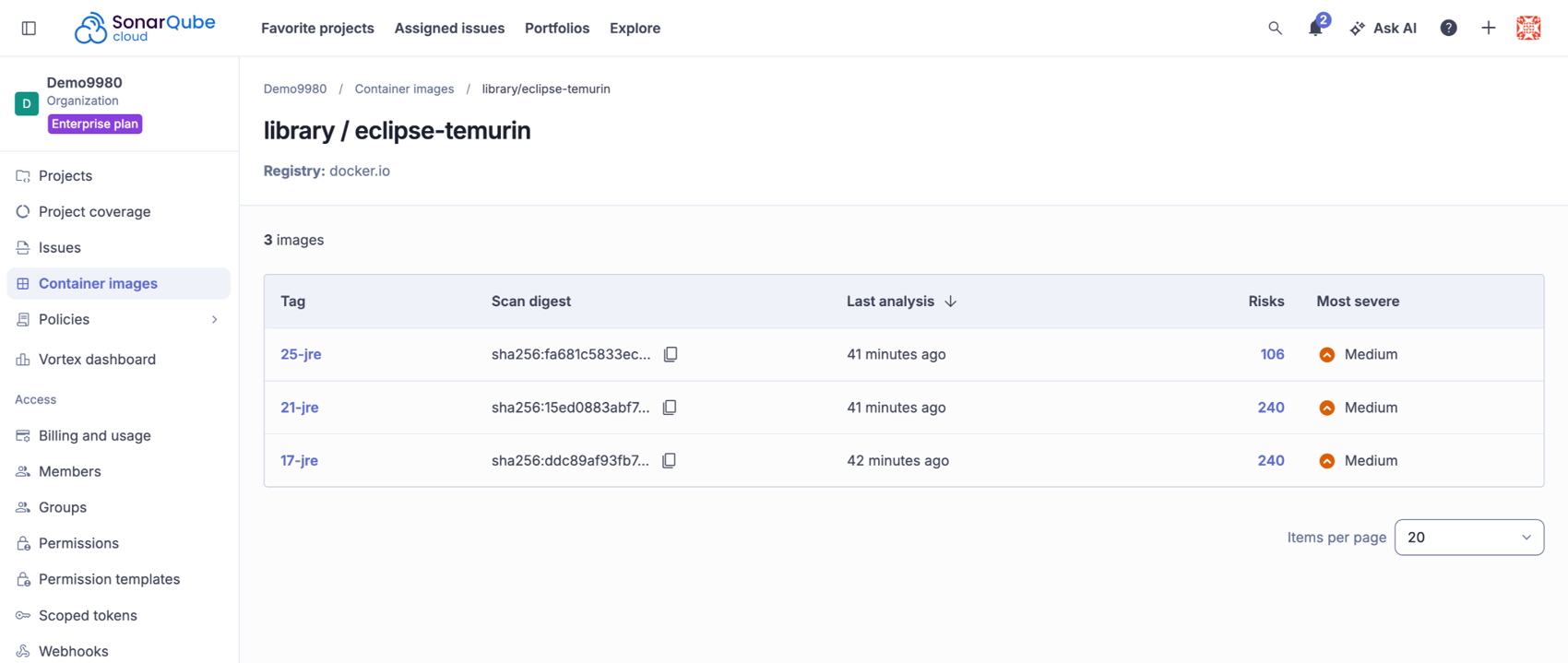
Screenshot 1. One repository, one row per scanned tag.
What it shows. The eclipse-temurin repository with its three scanned tags, 25-jre, 21-jre and 17-jre. Each tag is its own scan, with a scan digest, the time of its last analysis, the number of risks (106, 240 and 240) and the most severe risk, which is Medium for all three. Use it to compare JDK lines side by side and open the tag you run in production.
2. Find every Java image in your organization
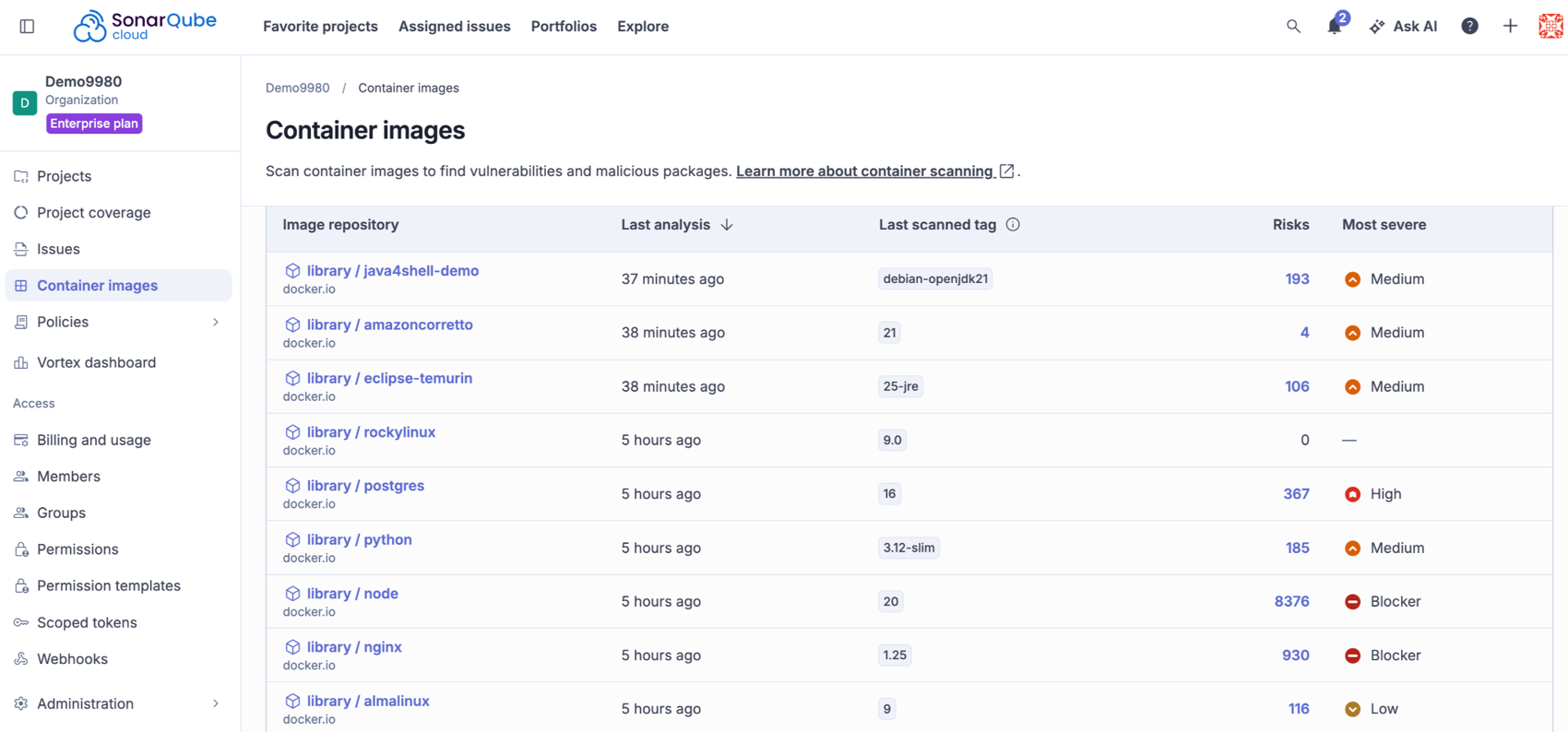
Screenshot 2. Every image repository you have scanned, newest first.
What it shows. The organization-wide Container images list: repository, time of last analysis, last scanned tag, risk count and most severe risk. The most recently scanned entries are Java images, java4shell-demo (debian-openjdk21, 193 risks), amazoncorretto (21, 4 risks) and eclipse-temurin (25-jre, 106 risks), with the other repositories below. Start here to pick out the images that carry a JDK.
3. Spot the JDK flaw among the other risks in an image
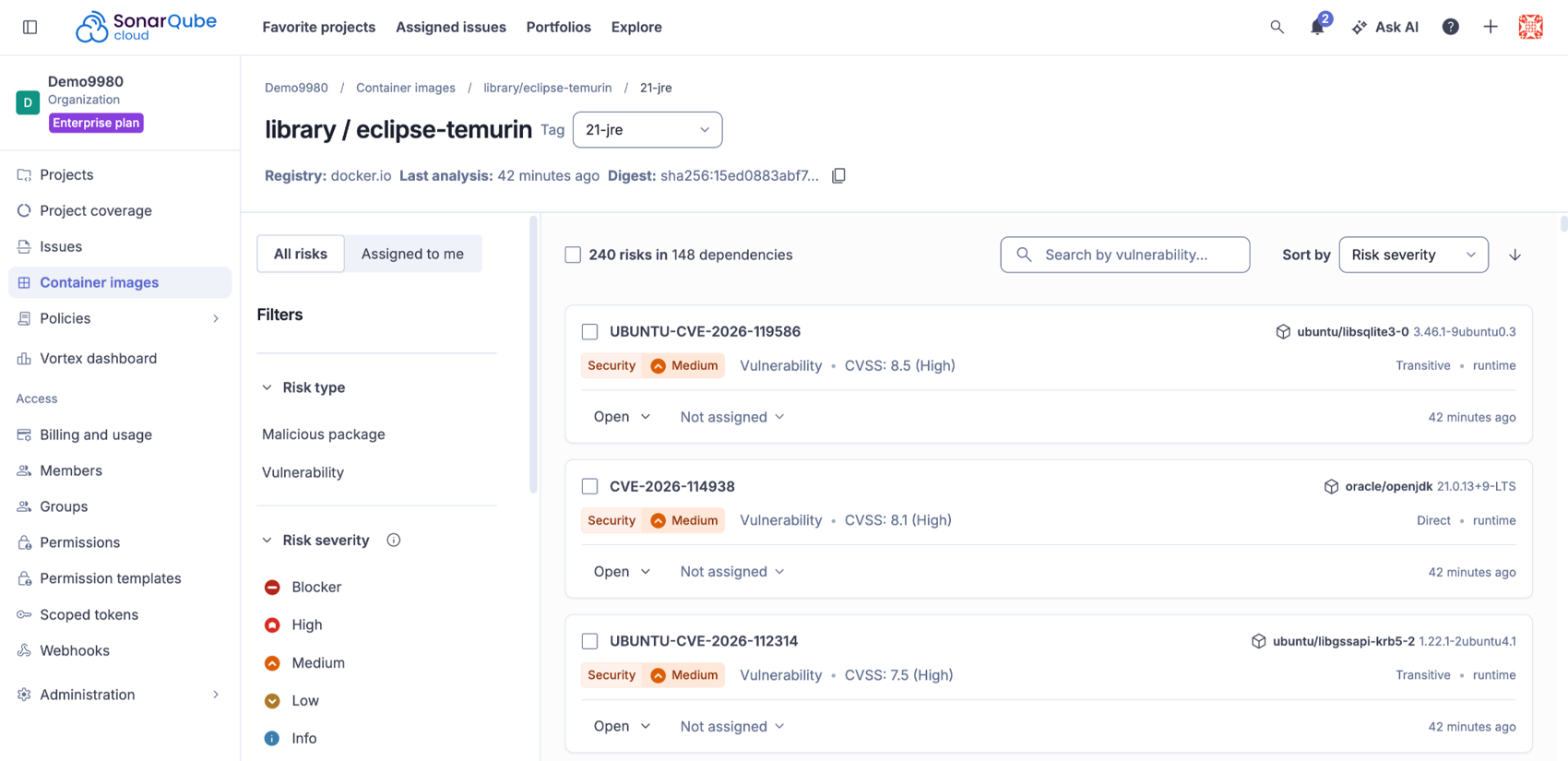
Screenshot 3. The JDK risk sits in the same list as operating system package risks.
What it shows. The eclipse-temurin 21-jre tag with 240 risks across 148 dependencies, sorted by severity. CVE-2026-114938 appears against oracle/openjdk 21.0.13+9-LTS as a direct runtime dependency with a CVSS score of 8.1 (High), alongside Ubuntu package advisories such as libsqlite3 and libgssapi. Use the search box to look up the CVE, the filters to narrow by risk type or severity, and the status and assignee controls on each row to start triage.
4. Read the risk and decide what to do
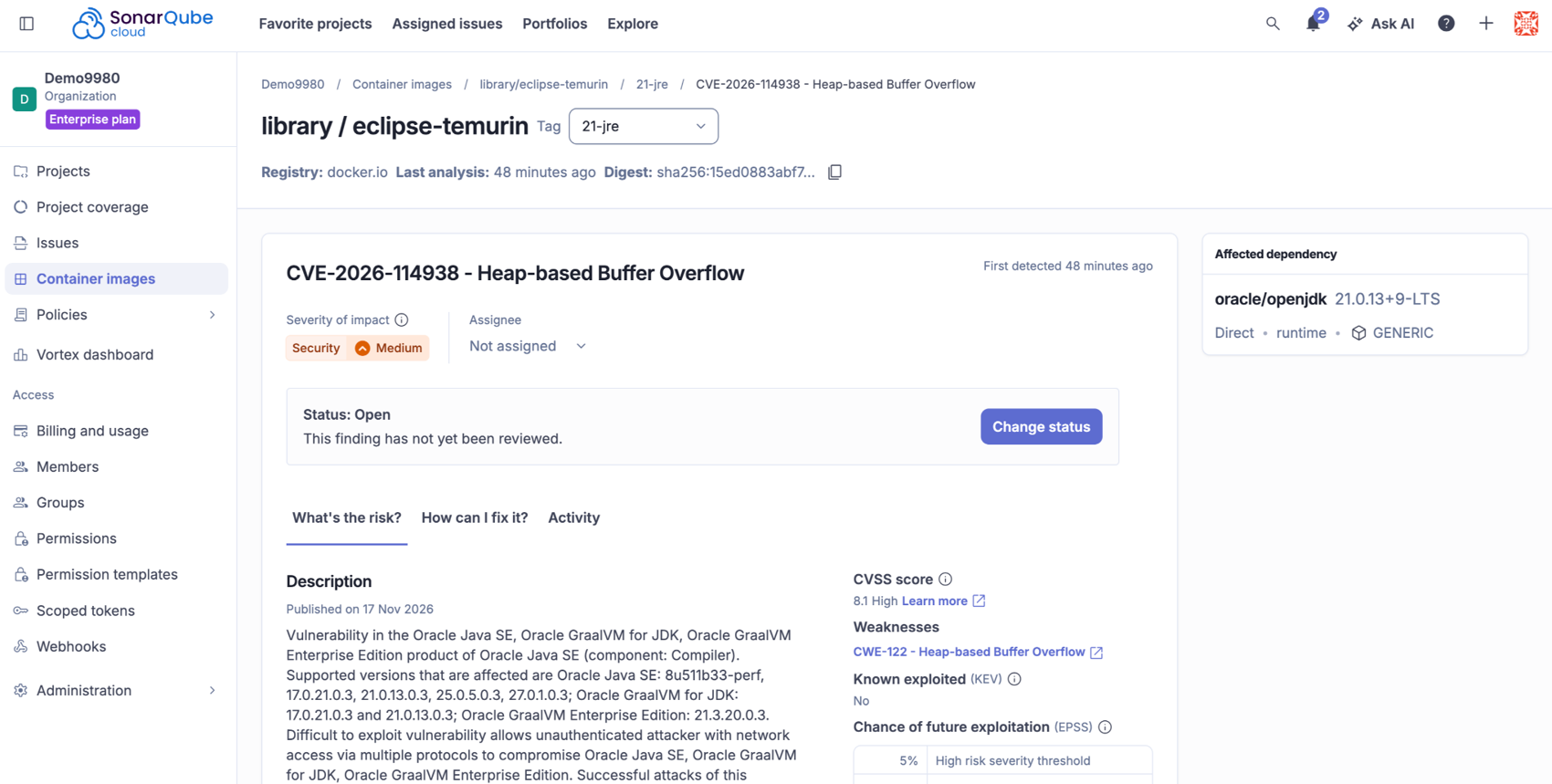
Screenshot 4. The detail page for the Java4Shell risk.
What it shows. The detail page for CVE-2026-114938, a heap-based buffer overflow (CWE-122) published on November 17, 2026, with the affected dependency, oracle/openjdk 21.0.13+9-LTS, in the side panel. The page shows the severity, the status (Open, with a Change status button), an assignee, the CVSS score and whether the CVE is on the Known Exploited Vulnerabilities list, which it is not in this screenshot, plus a chance-of-exploitation section. The tabs, What’s the risk, How can I fix it and Activity, take you from the description to remediation and the history of the risk.
Fix it
- Update the JDK. Rebuild each affected image on a base image with a patched OpenJDK, or update the vendor package, then push the new image.
- Scan the rebuilt image and confirm CVE-2026-114938 no longer appears under its risks.
- Add the scanner to CI with
--fail-on high, or a threshold you choose, so a vulnerable runtime cannot ship again unnoticed.
Java4Shell follows PHP2Shell: two critical flaws in a runtime inside your images within weeks. Both are invisible to code and dependency scans, and both show up when you scan the image.
Try it today. Container scanning is part of SonarQube Advanced Security on SonarQube Cloud.
How do I get started?
You need:
- a SonarQube Cloud organization with SonarQube Advanced Security;
- a SonarQube Cloud user token; and
- the image available locally or in CI.
Download the scanner for your platform from the scanner download page and follow the install steps in the documentation. Then set your organization and token as environment variables, so the token doesn’t appear in logs or process listings, and run the scanner:
export SONAR_CONTAINER_SCANNER_ORG=<ORGANIZATION_KEY>
    export SONAR_CONTAINER_SCANNER_TOKEN=<TOKEN>
    sonar-container-scanner <IMAGE>
By default, the scanner fails your build when it finds risks of high severity or above. Use --fail-on to change the threshold, for example to stop on medium risks too:
docker build -t my-app:${BUILD_TAG} .
sonar-container-scanner my-app:${BUILD_TAG} --fail-on medium
The container scanning documentation covers CI secrets, supported image inputs, caching and every option.
What do you see in SonarQube Cloud?
Select Container images in the sidebar of your organization to see every image you have analyzed, with its tag, number of risks, most severe risk and when it was last analyzed. Open an image to see its versions and their risks, and manage them with the same workflow you use for dependency risks in your projects. When an image itself changes, run the scanner again to refresh its results.
Why use SonarQube for container scanning?
SonarQube is the independent code verification and governance platform for the code you write, the dependencies you import, and the images you ship. It doesn’t depend on any one cloud, model or agent vendor. For container images, that means:
- One place for all of it. Image risks sit next to your code and dependency risks, in the same workflow.
- Checks where developers build. Run it locally or in CI, and stop a risky image before it ships.
- An inventory that stays current. Every image version you analyze is re-checked as new vulnerabilities are published.
Availability
Container scanning is generally available on SonarQube Cloud for organizations with SonarQube Advanced Security on the Team or Enterprise plan, at no additional cost. Support for SonarQube Server is planned.
Try it today
Read the container scanning docs and run your first scan on an image you already build. New to SonarQube Advanced Security? Start a free trial.