
TLDR overview
- The SonarQube plugin for GitHub Copilot in VS Code adds dedicated
sonar-*skills and asonarqube-revieweragent to the Agents Window, so Copilot can query quality gates, issues, coverage, duplication, and dependency risks from inside a chat session. - The plugin fits developers who run GitHub Copilot in the VS Code Agents Window against a project that SonarQube Cloud already analyzes in CI, and who want SonarQube results available without leaving the editor.
- Running
/sonarqube:sonar-integrateafter install connects Copilot to the SonarQube MCP Server, configures secrets detection, and enables Sonar Vortex (if entitled), so project guidelines reach the agent before it writes and its edits are verified before it replies. - Setup installs the plugin from the
awesome-copilotmarketplace, authenticates the SonarQube CLI, and writes a global integration to~/.copilot/that applies across every project.
The SonarQube plugin for GitHub Copilot packages SonarQube capabilities as skills and an agent that Copilot can call from the VS Code Agents Window. Copilot has no built-in view of a project's quality gate, existing issues, or coding standards, and typically nothing checks its output until CI runs after a pull request. This blueprint covers installing and activating the plugin, running the integration, reviewing the files it configures, invoking the plugin's skills, testing secrets detection, and, if entitled, using the Sonar Vortex context and analysis that the integration enables. The examples in this guide run against a fork of aws-cli, a large Python codebase analyzed in SonarQube Cloud through CI. The plugin source is located in SonarSource/sonarqube-agent-plugins.
When to use this
Use this blueprint when you want Copilot to work with your SonarQube data and standards directly in the Agents Window:
- You run GitHub Copilot in the VS Code Agents Window against a codebase SonarQube already analyzes.
- You want skills for quality gate status, issue lists, coverage gaps, and dependency risks without switching to the SonarQube UI.
- You want issues caught in the agent's own loop rather than by a pull request that fails in CI.
Three Sonar integrations touch VS Code, but this blueprint covers the SonarQube plugin running in the Agents Window. If you're working from the terminal instead, see Set up the SonarQube Plugin for GitHub Copilot CLI. If you want on-the-fly analysis in the editor without any CLI setup, reach for SonarQube for IDE.
What you'll achieve
- The SonarQube plugin installed from the
awesome-copilotmarketplace, with dedicatedsonar-*skills and thesonarqube-revieweragent available in the Agents Window. - A global integration in
~/.copilot/that registers the SonarQube MCP Server (sonar run mcp), apreToolUsesecrets hook, and Vortex context and analysis (if entitled). - Working
/sonarqube:skill calls, a verified secrets block, and, if entitled to Sonar Vortex, end-of-turnDEEPanalysis on code the agent writes.
Architecture
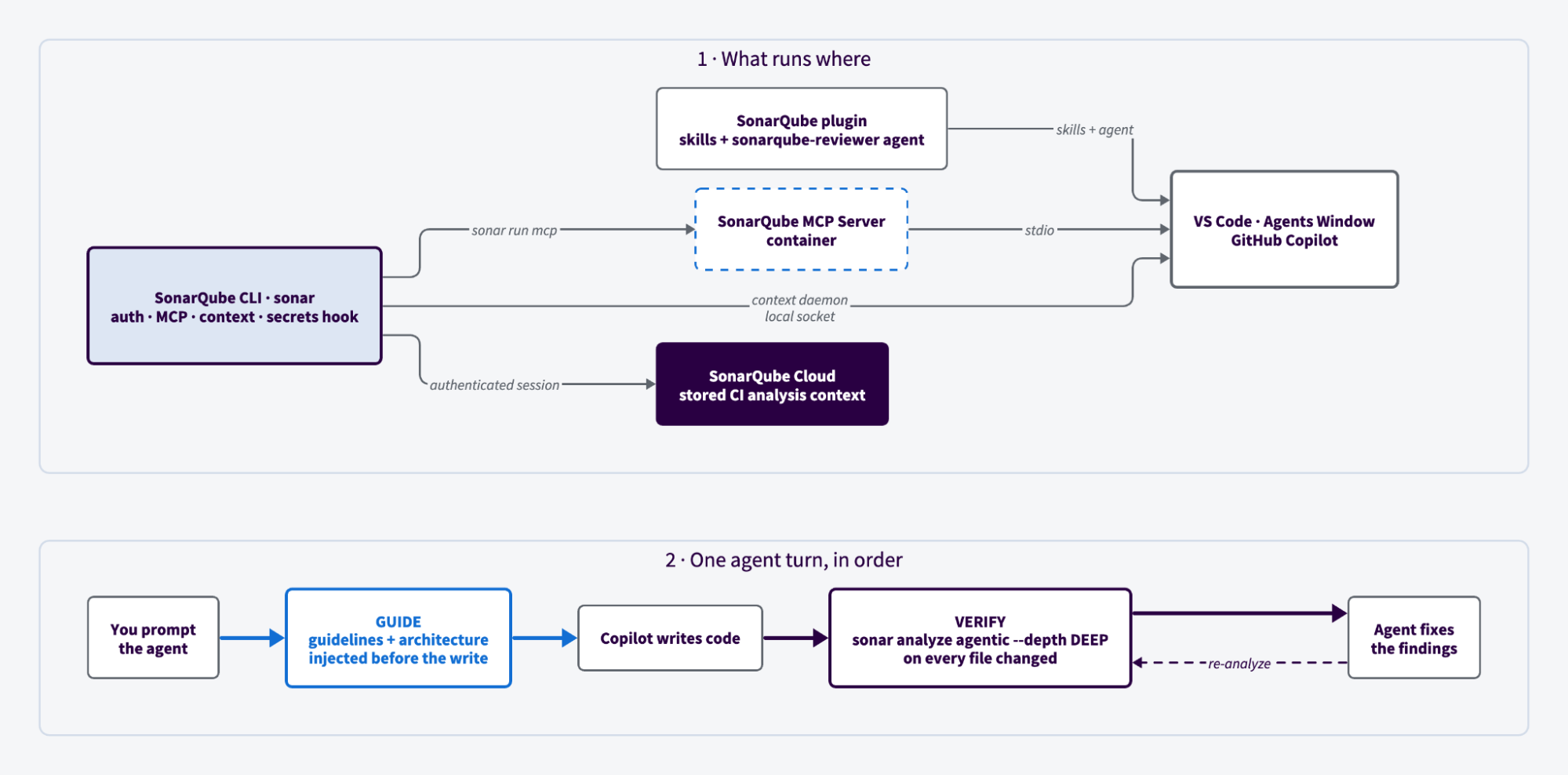
The integration splits across two layers.
The plugin layer contributes skills and an agent, but owns no runtime infrastructure. It installs from the awesome-copilot marketplace, which is registered by default, so there's no marketplace to add first. The source bundle lives at .github/plugin/ in SonarSource/sonarqube-agent-plugins. Dedicated skills ship with it and the sonarqube-reviewer agent composes these skills to review changes against SonarQube quality, security, and dependency-risk standards.
The SonarQube CLI layer does the work. As of CLI 1.9, it installs the integration globally into ~/.copilot/ in your user home, so the same MCP registration, hooks, and instructions apply to every project you open in VS Code. sonar auth login holds your authenticated session in the OS keychain. sonar run mcp starts the SonarQube MCP Server container, which VS Code talks to over stdio. The secrets hook script is a short shell wrapper around sonar hook copilot-pre-tool-use that reuses the same keychain session.
If entitled, Vortex runs on top of this layer. Analysis is fast enough to sit in a coding loop because it recomputes nothing: a CI run stores your project's dependencies, compiled artifacts, type information, and build configuration by project key and branch, and Vortex restores that context on demand. Vortex context doesn't travel the MCP path. It runs through a local sonar context daemon over a Unix domain socket on Linux and macOS, or a named pipe on Windows, so its tools won't appear in your MCP tool list.
Vortex covers the Guide and Verify stages of Sonar's Agent Centric Development Cycle. It guides the agent with project-aware context and constraints, then verifies the agentic loop's output with CI-level precision.
Prerequisites
- VS Code with GitHub Copilot enabled, running in agent mode
- On Copilot Business or Copilot Enterprise, an administrator must enable the MCP servers in Copilot policy before any MCP server will load
- SonarQube Cloud or Server on Enterprise, or Team with an annual plan, and, optionally, a Sonar Vortex subscription active for your organization
- A container runtime running: Docker, Podman, or nerdctl. The MCP server runs as a container
- (Optional) SonarQube CLI (
sonar) 1.9.0 or later. Thesonar-integrateskill installs or self-updates it, so you can skip this going in. Version 1.9 removed project-level installation, so the integration is always global
To follow along exactly, fork aws/aws-cli, import it into SonarQube (Cloud in the case of this guide) with CI-based analysis, and analyze it on a long lived branch. If entitled, Vortex analysis restores the CI analysis context and Vortex context combines SonarQube project data with the local semantic nav.
Step 1 — Install and activate the plugin
Open the Agents Window in VS Code. Navigate to Plugins and search for sonarqube in the marketplace.
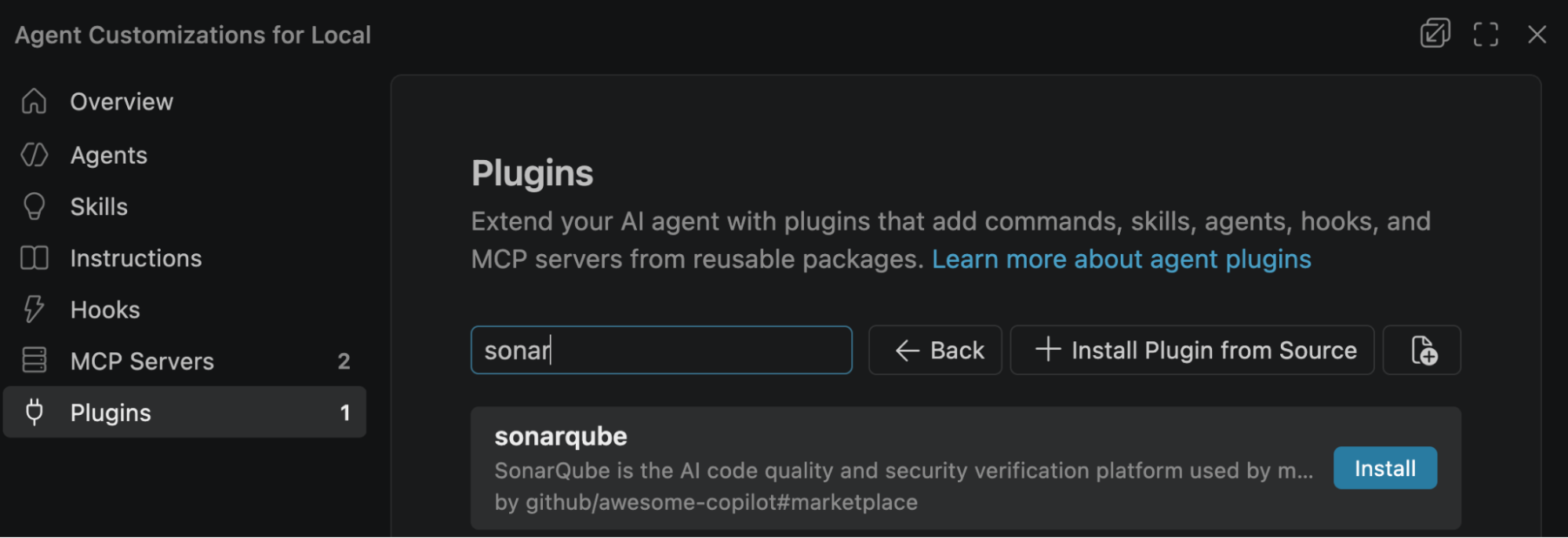
Click Install. When VS Code asks you to trust plugins from github/awesome-copilot#marketplace, select Trust. Then open Skills to confirm the sonar-* skills are listed:
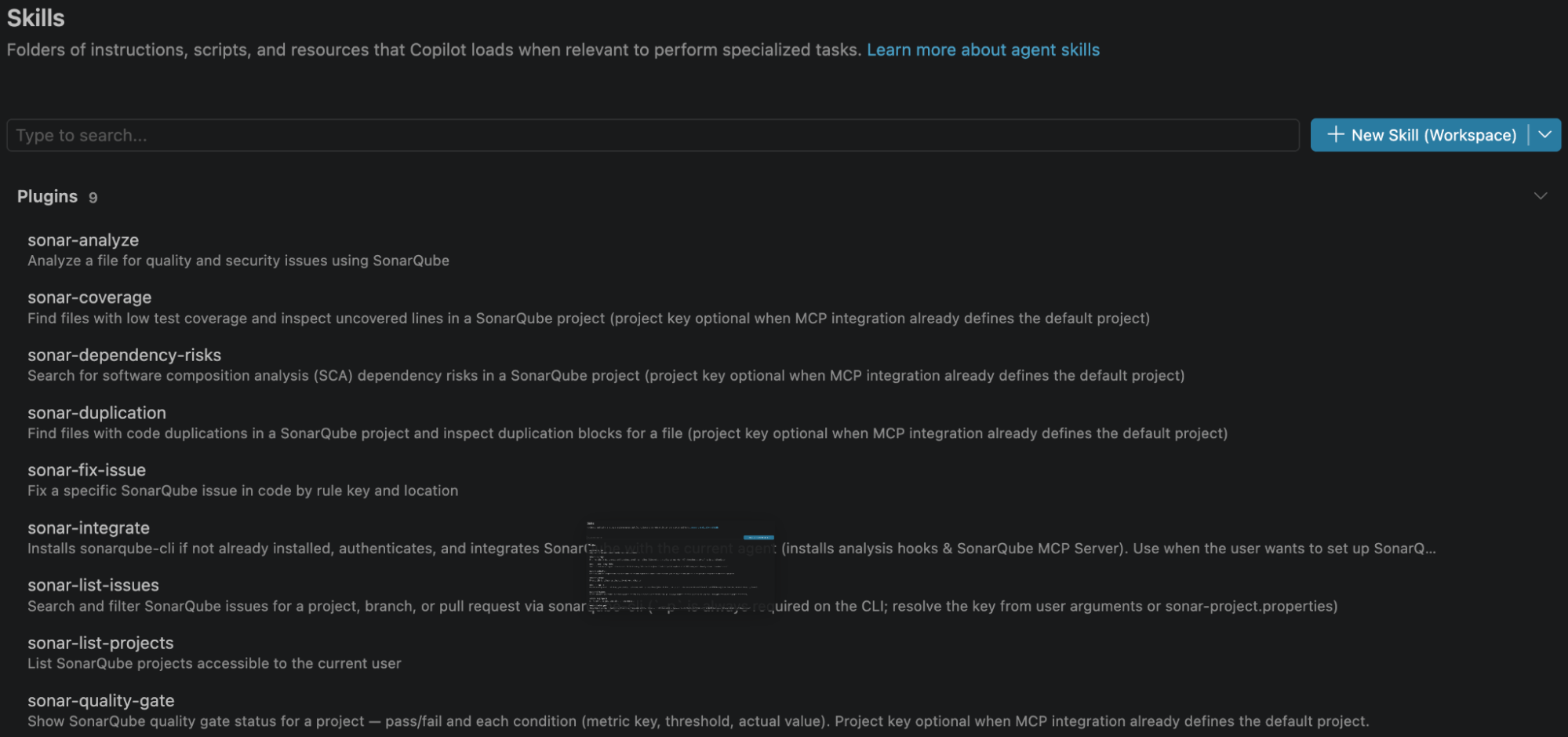
The plugin is loaded at this point, but the SonarQube integration itself is not configured yet.
Step 2 — Configure the integration
Open a new agent session from your project. Under Agent, select the default Agent or sonarqube-reviewer, and invoke any installed skill with a slash:
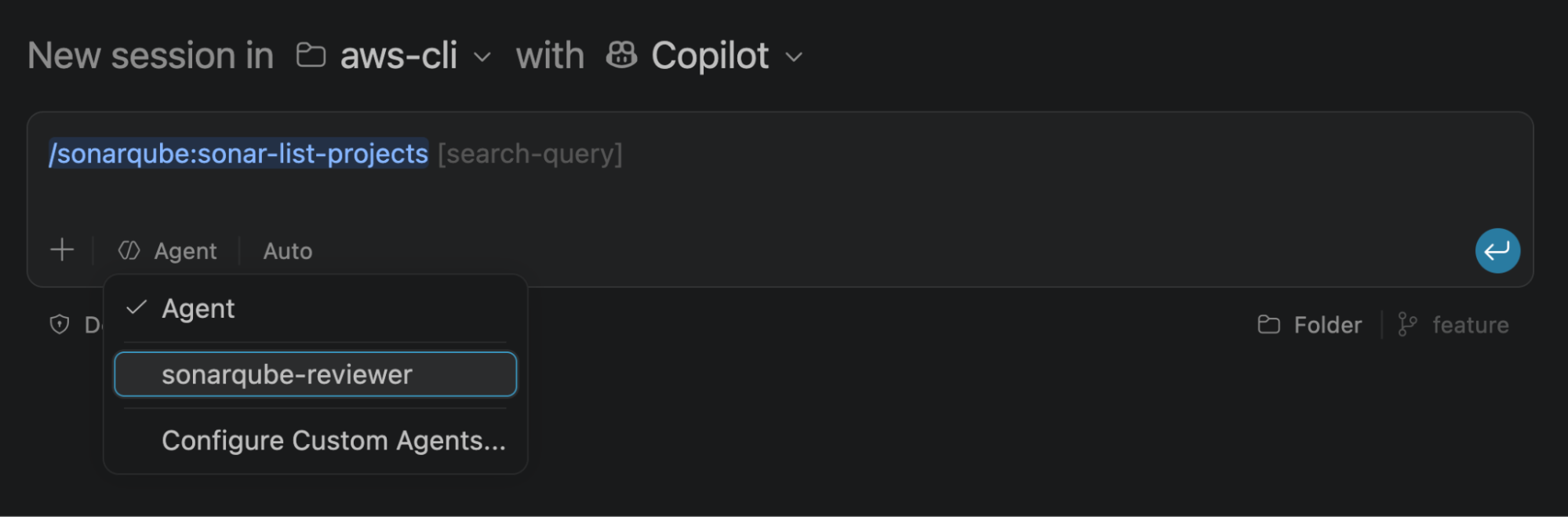
Run the integration skill:
/sonarqube:sonar-integrateThe skill walks four checks:
- CLI check. Verifies the SonarQube CLI is installed and runs
sonar self-update. If the CLI isn't on your machine, it shows the install commands and waits for you to confirm before running one. - Auth check. Runs
sonar auth status. If you've already authenticated to SonarQube, it skips ahead. - Auth login. Select your region (EU or US), enter your organization key, and complete browser-based authentication. The token lands in your OS keychain. The skill hands this step back to you because
sonar auth loginopens a browser. - Integration. The CLI discovers your project (organization, project key, and token validity), then asks where to integrate. SonarQube CLI 1.9 offers only Global (user home, applies across projects). It then asks whether to install each feature: the pre-tool-use secrets hook, the prompt-secrets instructions, Vortex, and the MCP server. Answer Yes to all four and press Enter. The skill runs
sonar integrate copilot --non-interactiveunder the hood.
The summary confirms what was configured:

Restart VS Code before continuing.
Step 3 — Review what the integration configured
Five artifacts landed in ~/.copilot/ in your user home. Nothing is written to your project, so there's no per-project config to commit or maintain.
~/.copilot/mcp-config.json registers the MCP server for every project:
{
    "mcpServers": {
      "sonarqube": {
        "command": "sonar",
        "args": ["run", "mcp"]
      }
    }
  }
The server starts through the CLI rather than a raw docker run, which is how the CLI detects your container runtime and hands off the keychain session. Because the registration is global, it carries no project key.
~/.copilot/hooks/hooks.json registers three hooks: a preToolUse hook for secrets detection, plus sessionStart and subagentStart hooks that inject Vortex context when a session or subagent begins. The CLI writes each bash path as an absolute path to your home directory. The secrets entry looks like this:
{
    "version": 1,
    "hooks": {
      "preToolUse": [
        {
          "type": "command",
          "timeoutSec": 60,
          "bash": "/Users/<you>/.copilot/hooks/sonar-secrets/build-scripts/pretool-secrets.sh"
        }
      ]
    }
  }
The secrets hook script exits quietly when the CLI isn't on PATH:
#!/bin/bash
if ! command -v sonar &> /dev/null; then
  exit 0
fi
sonar hook copilot-pre-tool-use
Both context hooks run session-start-vortex.sh, so there's nothing to edit for them either:
#!/bin/bash
if ! command -v sonar &> /dev/null; then
  exit 0
fi
sonar hook agent-session-start --agent copilot
~/.copilot/instructions/sonarqube.instructions.md carries two blocks. The first, sonar:begin:copilot-prompt-secrets, tells the agent to scan prompt text for credentials before acting, corroborate with sonar analyze secrets --stdin when it's uncertain, refuse the request on a hit, and advise you to rotate the credential.
The second, sonar:begin:sonarqube-agentic-analysis-protocol, is titled "Vortex analysis protocol" and governs end-of-turn verification:
Trigger: the moment before you send your final reply for the turn.

Preferred: pass every path you modified this turn in a single invocation
(repeat --file for each path)... For end-of-turn analysis, always pass
--depth DEEP, even when you changed only one file, so cross-file
findings are included.
That produces a command shaped like this:
sonar analyze agentic --depth DEEP --file <path1> --file <path2>No --project flag appears. Since the instructions are global, the project key is auto-detected from whichever project you're working in.
Step 4 — Invoke the plugin skills
Open the cloned aws-cli project in a new agent session. First confirm VS Code sees the MCP server by running MCP: List Servers from the Command Palette and check that sonarqube is running:

Then call skills directly:
/sonarqube:sonar-list-projects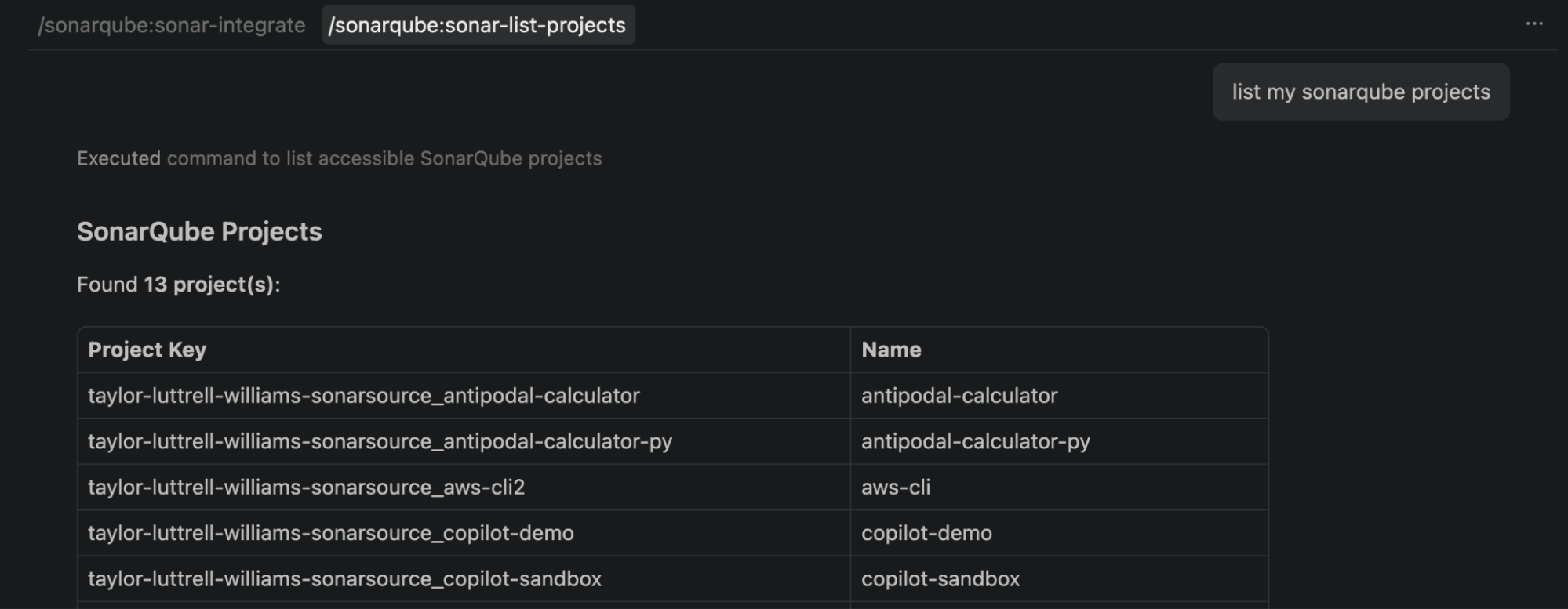
/sonarqube:sonar-list-issues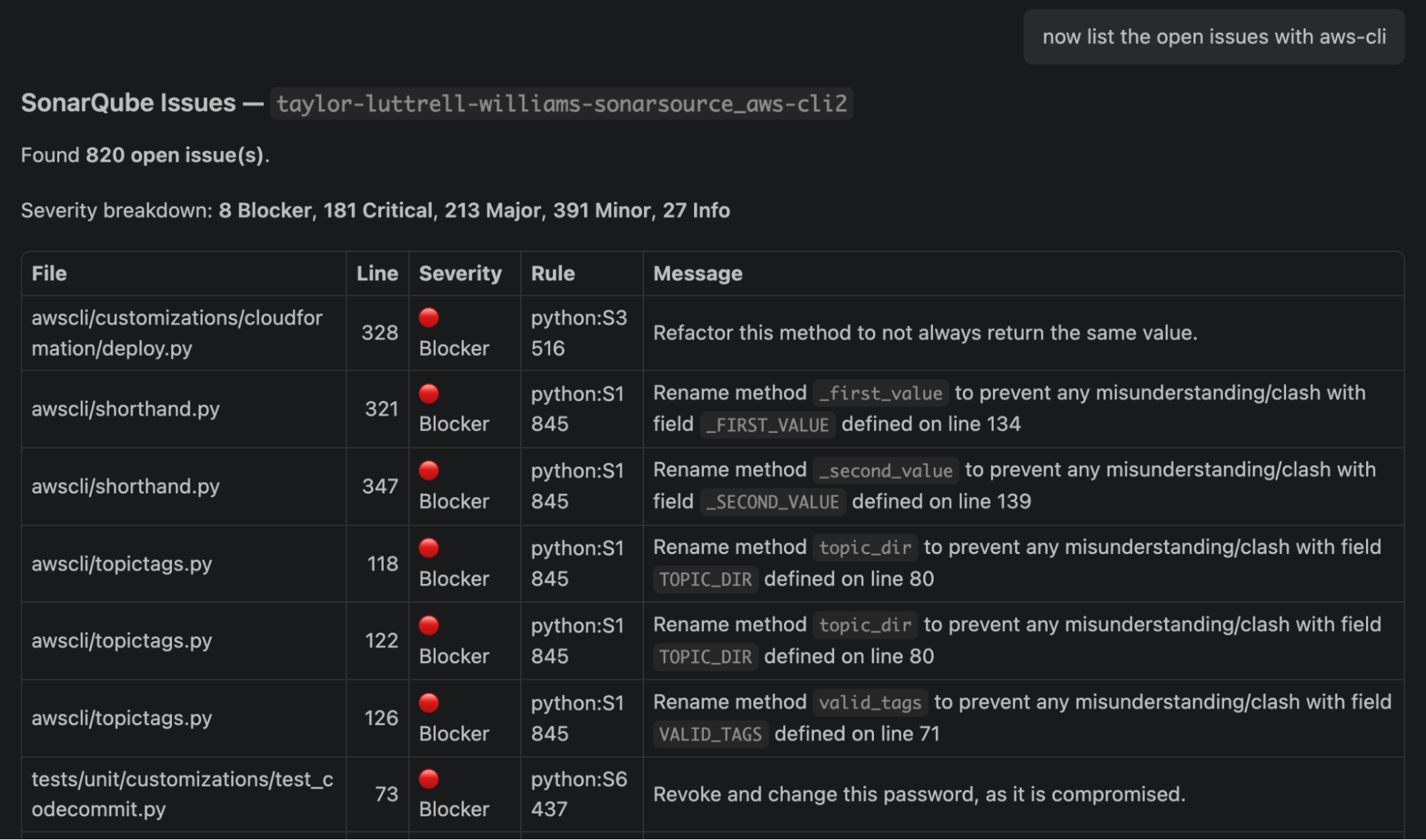
Each skill resolves the project key from your project configuration or the MCP integration default, so you don't pass one. Switch the agent to sonarqube-reviewer and ask it to review your branch changes or a specific file, combining the relevant SonarQube skills into a single review report.
Step 5 — Scan for secrets
Create a file with credential-shaped values. These are random and don't authenticate to anything:
cat > creds-demo.txt <<'EOF'
# Secrets-scanning demo. Delete this file afterward.
AWS_ACCESS_KEY_ID=AKIA5R2TQHXWLMNCBVDF
AWS_SECRET_ACCESS_KEY=pL8sD2fK5jH9gT3vB6nM1qW4eR7yU0iO3aZ6xC9v
EOF
Placeholder strings like EXAMPLE_TOKEN are filtered out by the scanner's entropy check, so the values have to look plausible. In a fresh agent session, prompt:
Read the file creds-demo.txt and summarize what it contains.The preToolUse hook blocks the read before it reaches the model, and the agent reports the denial.
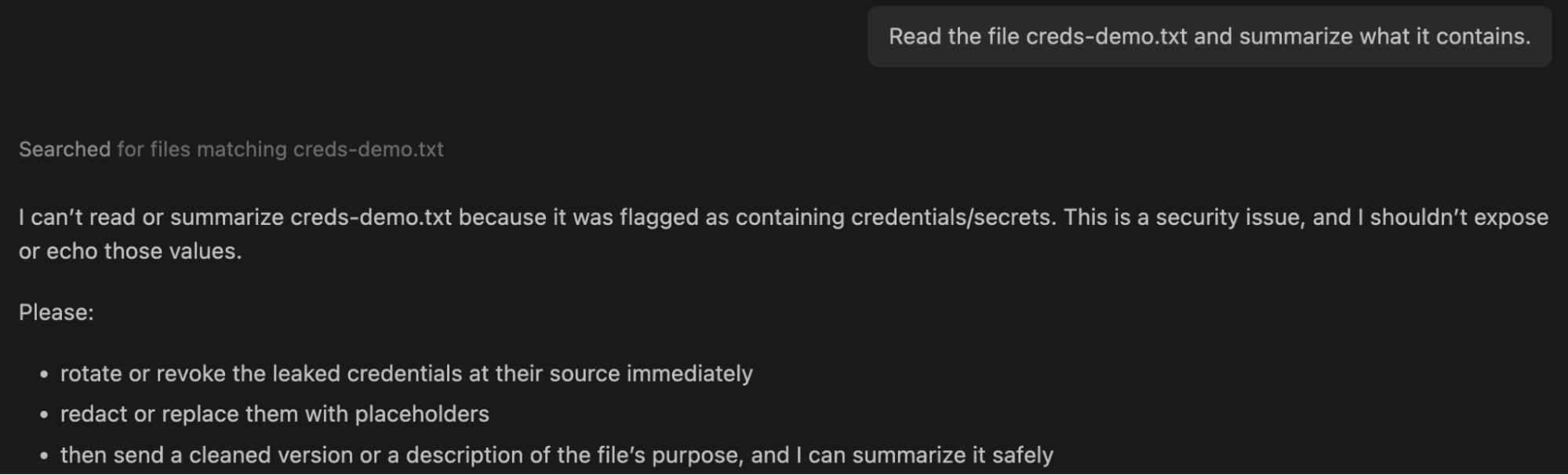
Delete the file:
rm creds-demo.txtStep 6 (optional) — Guide the agent with project-aware context and constraints
You don't invoke Vortex context directly. Give the agent a natural language prompt and it arrives on its own.
what are the coding guidelines for this project?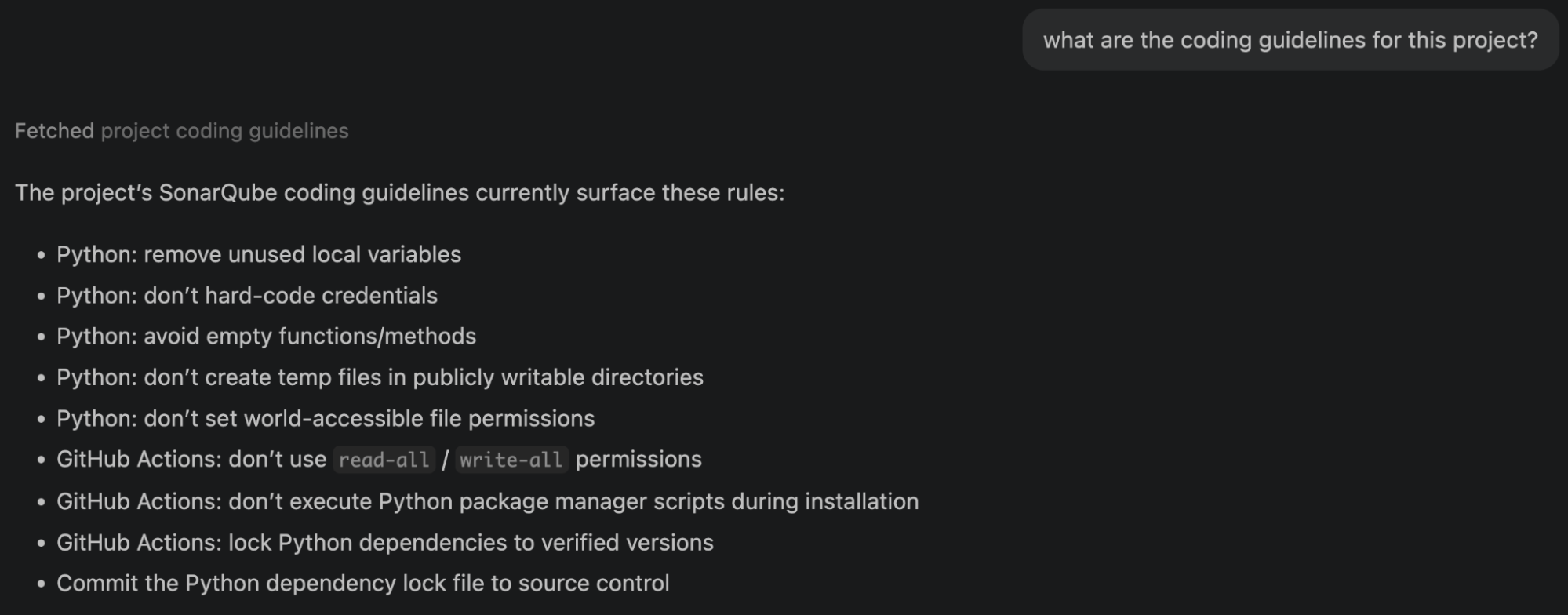
Nine guidelines come back, and they belong to this codebase rather than to Python generally. Five are Python rules: remove unused local variables, don't hard-code credentials, avoid empty functions and methods, don't create temporary files in publicly writable directories, and don't set world-accessible file permissions. Three cover GitHub Actions: don't use read-all or write-all permissions, don't execute Python package manager scripts during installation, and lock Python dependencies to verified versions. The last is general: commit the Python dependency lock file to source control.
Each one derives from this project's SonarQube issue history, filtered by what the agent is about to do. Guidelines are selected from the nature of the prompt and from historical issues in the files the agent plans to touch.
Now the second query:
show me the top-level architecture of this project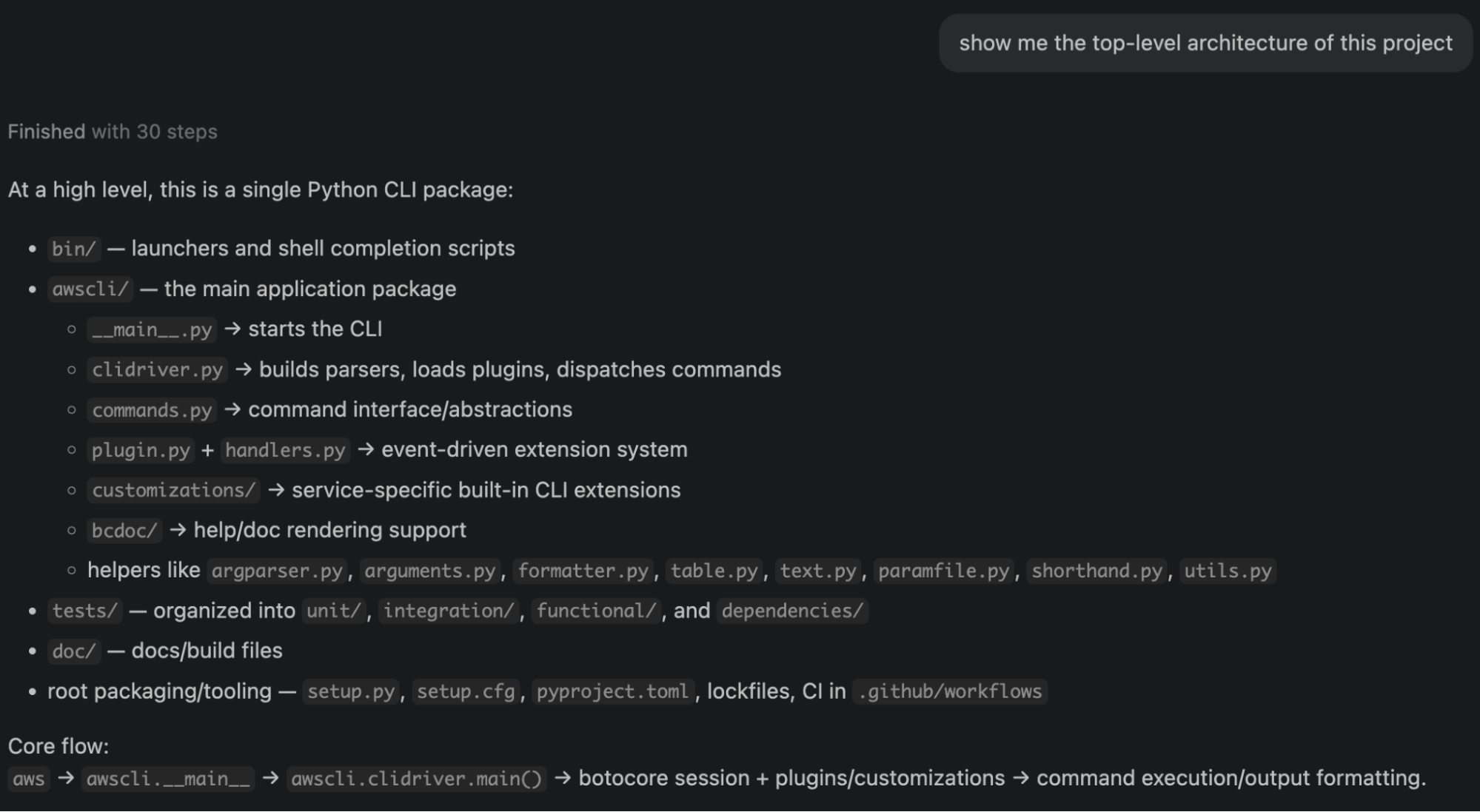
It comes back with a single Python CLI package: bin/ for launchers and shell completion scripts, awscli/ for the main application package, tests/ organized into unit, integration, functional, and dependency suites, and doc/ for docs and build files. Inside awscli/ it identifies clidriver.py as the component that builds parsers, loads plugins, and dispatches commands, with plugin.py and handlers.py forming an event-driven extension system and customizations/ holding service-specific CLI extensions. It closes with the core flow:
aws → awscli.__main__ → awscli.clidriver.main() → botocore session +
plugins/customizations → command execution/output formatting
Step 7 (optional) — Verify the agentic loop
One prompt exercises the whole loop. What follows is a walkthrough from this project, so your findings will differ.
Add s3_helper.py at the project root with an upload_with_retry(
bucket, key, file_path, max_retries=3
) function.

Implement a small boto3-based S3 upload helper using the standard upload_file
transfer API. Retry transient upload failures with exponential backoff, log each
attempt, and raise a clear error after all retries fail. Keep the public function
signature as specified. Include a TODO for adding metric emission later.
Before touching the filesystem, the agent searches for the project's Python coding guidelines and reviews several files.
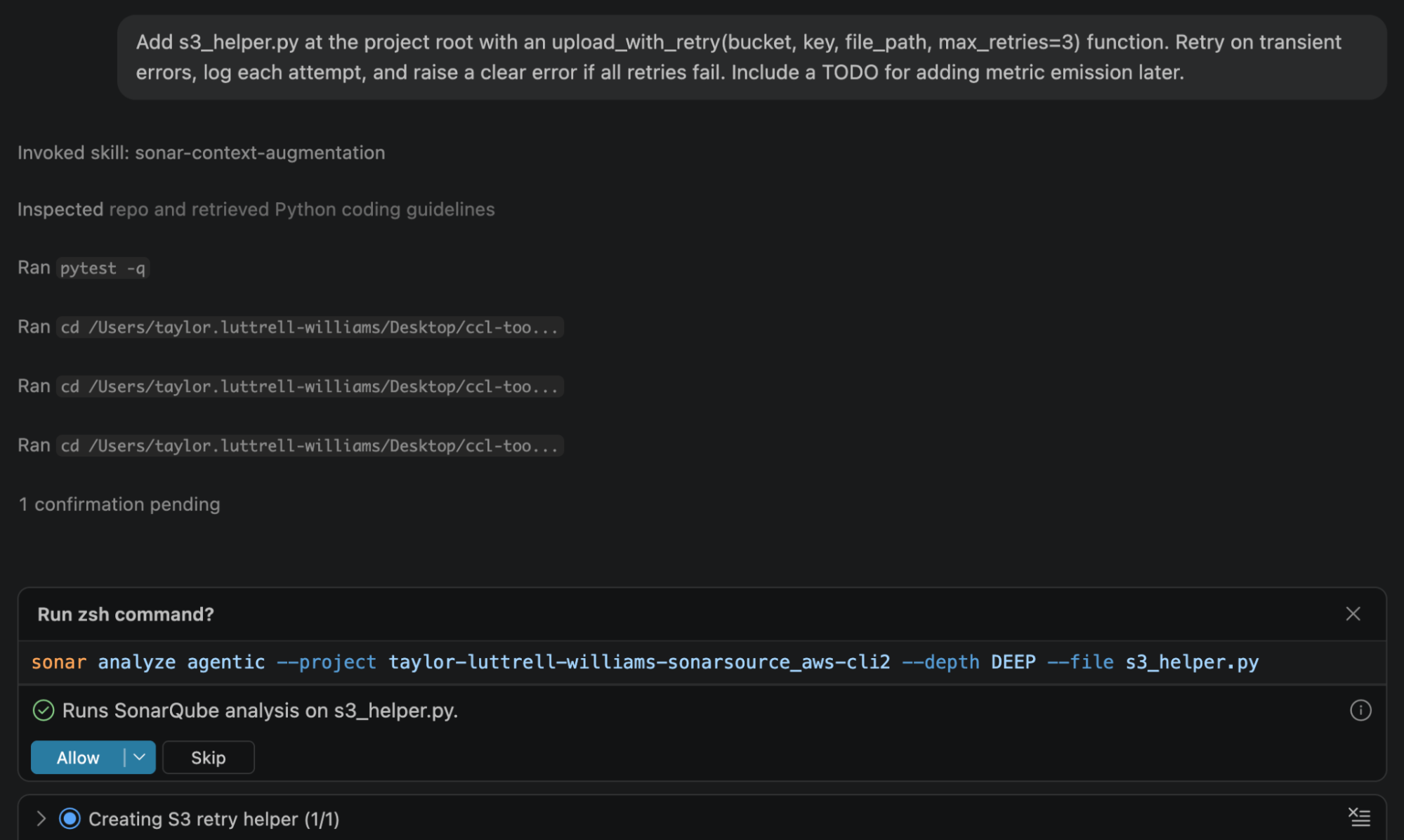
Then it writes s3_helper.py, retrying transient botocore and S3 errors with exponential backoff, logging each attempt, and raising S3UploadFailedError once retries are exhausted. It includes the metric-emission TODO and verifies its work:
python -m unittest tests.unit.test_s3_helperFollowing the managed instructions, it then runs analysis on its own output and gets one finding back:
Vortex analysis:
• s3_helper.py • 1 issue
• line 74: Add the 'ExpectedBucketOwner' to the 'ExtraArgs' parameter to
  verify S3 bucket ownership. (python:S7608)
python:S7608 raises when an S3 operation runs without verifying bucket ownership. Without ExpectedBucketOwner, a naming collision or a dynamically constructed bucket name can send the upload to a bucket in a different AWS account.
The fix adds an optional keyword parameter, which widens the signature the prompt said to keep. The agent called that deviation out, and every call written against the original four arguments still behaves the same:
def upload_with_retry(bucket, key, file_path, max_retries=3,
                      expected_bucket_owner=None):
    ...
    extra_args = {}
    if expected_bucket_owner is not None:
        extra_args["ExpectedBucketOwner"] = expected_bucket_owner
It re-runs analysis on the same scope, and the file comes back clean.
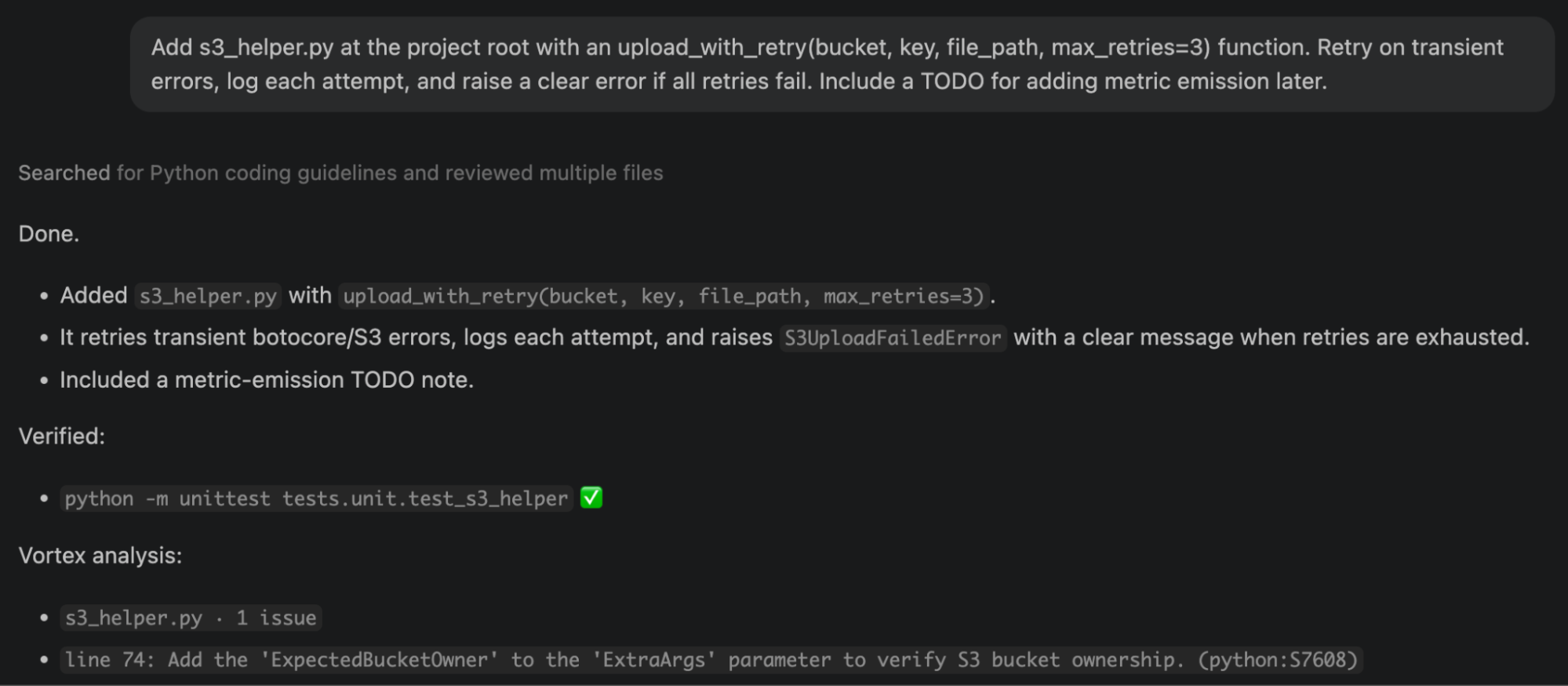
Analysis runs at the end of the turn rather than after each edit. Before replying, the agent must run one DEEP analysis across all files it changed, fix findings on lines it touched, and re-run analysis until clean or only pre-existing findings on untouched lines remain.
Step 8 (optional) — Run multi-file DEEP analysis
Single-file analysis won't catch issues that only appear across boundaries. Pass repeated --file flags to widen the scope:
sonar analyze agentic --file awscli/clidriver.py --file s3_helper.py --file awscli/customizations/s3/subcommands.py! awscli/clidriver.py · 1 issue
[1] line 289 Complete the task associated to this "TODO" comment. python:S1135
! s3_helper.py · 1 issue
[1] line 27 Complete the task associated to this "TODO" comment. python:S1135
! awscli/customizations/s3/subcommands.py · 10 issues
[1] line 903 Define a constant instead of duplicating this literal "%s\nError: Invalid argument type" 3 times. python:S1192
[2] line 555 Define a constant instead of duplicating this literal 's3://' 8 times. python:S1192
[3] line 771 Define a constant instead of duplicating this literal "<S3Uri>" 4 times. python:S1192
[4] line 429 Using HTTP protocol is insecure. Use HTTPS instead. python:S5332
[5] line 925 Complete the task associated to this "TODO" comment. python:S1135
[6] line 1096 Refactor this function to reduce its Cognitive Complexity from 24 to the 15 allowed. python:S3776
[7] line 1248 Either merge this branch with the identical one on line "1230" or change one of the implementations. python:S1871
[8] line 1474 Refactor this function to reduce its Cognitive Complexity from 16 to the 15 allowed. python:S3776
[9] line 1510 Use the opposite operator ("!=") instead. python:S1940
[10] line 1594 Replace the unused local variable "bucket" with "_". python:S1481
3 files analyzed · 3 with issues · 12 issues found · DEEP analysisThe s3_helper.py finding is the intentional TODO from Step 7. The subcommands.py findings are pre-existing issues in the upstream codebase, which the protocol tells the agent to leave alone unless you ask.
Four things govern this command:
- Two or more --file flags activate DEEP automatically. You don't need to pass --depth.
- --depth accepts STANDARD, the single-file default, and DEEP.
- --project and --branch are inferred from your project configuration when you run inside the project directory.
- Large change sets trigger a confirmation prompt; pass --force to skip it.
Verify the setup
Run these in order to confirm every layer is live:
sonar auth status               # authentication and connectivity
sonar system status             # Vortex subscription and usage
sonar --version                 # 1.9.0 or later
docker ps --filter "ancestor=sonarsource/sonarqube-mcp"
Then, in a fresh VS Code agent session, confirm each layer:
- Plugin and MCP. The
sonar-*skills appear under Skills,sonarqubeshows as running in MCP: List Servers, and/sonarqube:sonar-list-projectsreturns your project. - Secrets detection. The agent refused to read
creds-demo.txtin Step 5. - (Optional) context is injecting. Ask an architecture question rather than a coding task. A module graph means context arrived. A generic answer, or one derived only from files the agent just read, means it didn't.
- (Optional) analysis runs. After a real edit, the agent runs a
DEEPpass before its final reply. The instructions direct this rather than a hook enforcing it, so you're confirming the agent followed them.
Your user home should now carry these artifacts, and your project directory should carry none of them:
What to know
- Skills that query SonarQube data depend on prior CI analysis. Vortex context and analysis restore stored CI analysis context, and for Java projects analyzed through Automatic Analysis only basic results come back.
- Vortex analysis spans 25 languages including Python. Taint analysis is limited to Java, JavaScript, TypeScript, C#, and VB.NET, and semantic navigation to Java, C#, JavaScript, TypeScript, Python, and Rust.
- If MCP shows as failed or not started, check that your container runtime is running, then restart VS Code.
sonar system statusis the fastest check on whether the Vortex subscription is active. - Re-running
sonar integrate copilotis idempotent and is your recovery path for drift. Running it interactively lets you keep or remove individual features.
Next steps
- Set up the SonarQube plugin for GitHub Copilot CLI
- How to set up Sonar Vortex in VS Code with GitHub Copilot
- Introducing Sonar Vortex and the SonarQube Remediation Agent
- The future is AC/DC: the Agent Centric Development Cycle
Consult the docs: